|
|
| (93 intermediate revisions by 2 users not shown) |
| Line 1: |
Line 1: |
| − | = System Architecture: = | + | = System Architecture = |
| | | | |
| | [[File:Rohm light tower sensor demokit 01.png|640x480px|Rohm light tower sensor demokit 01.png]] | | [[File:Rohm light tower sensor demokit 01.png|640x480px|Rohm light tower sensor demokit 01.png]] |
| Line 7: |
Line 7: |
| | [[File:EnOcean light sensor 01.png|480x280px|EnOcean light sensor 01.png]] | | [[File:EnOcean light sensor 01.png|480x280px|EnOcean light sensor 01.png]] |
| | | | |
| − | = Sensor Communication Protocol: = | + | <br/><span style="font-size:large;"><span style="color:#FF0000;">Notice: Please make sure DIP switch of Light Tower module is setting in normal mode as below diagram.</span></span> |
| | + | |
| | + | [[File:Tower Light normal mode.jpg|RTENOTITLE]] |
| | + | |
| | + | = Sensor Communication Protocol = |
| | | | |
| | [[File:EnOcean light sensor 03.png|480x100px|EnOcean light sensor 03.png]] | | [[File:EnOcean light sensor 03.png|480x100px|EnOcean light sensor 03.png]] |
| Line 13: |
Line 17: |
| | Lighting Condition Data Format: | | Lighting Condition Data Format: |
| | | | |
| − | First 4 bits = pervious status | + | *First 4 bits = pervious status |
| − | | + | *Last 4 bits = current status |
| − | Last 4 bits = current status | |
| | | | |
| | Lighting Condition Value Definition: | | Lighting Condition Value Definition: |
| | | | |
| − | 0x0 Light off | + | *0x0 Light off |
| − | | + | *0x1 Fast blink (0.5s per blink) |
| − | 0x1 Fast blink (0.5s per blink) | + | *0x2 Blinking medium speed (1s per blink) |
| | + | *0x3 Slow flashing (2s per blink) |
| | + | *0x4 Light on |
| | | | |
| − | 0x2 Blinking medium speed (1s per blink)
| + | For example, value of third light is 41. |
| | | | |
| − | 0x3 Slow flashing (2s per blink)
| + | *First 4 bits is 4 , which mean previous status is Light On |
| | + | *Last 4 bits is 1 , which mean current status is Fast Blink. |
| | | | |
| − | 0x4 Light on
| + | = Tower Light Data Format = |
| − | | |
| − | = Tower Light Data Format: = | |
| | | | |
| | [[File:EnOcean light sensor 02.png|480x320px|EnOcean light sensor 02.png]] | | [[File:EnOcean light sensor 02.png|480x320px|EnOcean light sensor 02.png]] |
| Line 35: |
Line 39: |
| | | | |
| | | | |
| − | = EnOcean Sample Program: =
| + | = Protocol Specification = |
| − | | |
| − | [[File:EnOcean light sensor 04.png|640x180px|EnOcean light sensor 04.png]]
| |
| − | | |
| − | | |
| − | | |
| − | = Data type and Data Format: =
| |
| − | | |
| − | '''Agent ID (Sensor ID):''' String
| |
| − | | |
| − | '''Sensor Data:''' Unsigned Integer number
| |
| − | | |
| − | = Data Capability in JSON: =
| |
| − | | |
| − | {
| |
| − | "susiCommData":{
| |
| − | "infoSpec":{
| |
| − | "SenHub":{
| |
| − | "SenData":{
| |
| − | "e":[
| |
| − | {
| |
| − | "n":"Header",
| |
| − | "u":"",
| |
| − | "v":0,
| |
| − | "min":0,
| |
| − | "max":255,
| |
| − | "asm":"r",
| |
| − | "type":"d",
| |
| − | "rt":"",
| |
| − | "st":"ipso",
| |
| − | "exten":""
| |
| − | },
| |
| − | {
| |
| − | "n":"ExtendedTelegramType",
| |
| − | "u":"",
| |
| − | "v":0,
| |
| − | "min":0,
| |
| − | "max":255,
| |
| − | "asm":"r",
| |
| − | "type":"d",
| |
| − | "rt":"",
| |
| − | "st":"ipso",
| |
| − | "exten":""
| |
| − | },
| |
| − | {
| |
| − | "n":"OriginatorID",
| |
| − | "u":"",
| |
| − | "sv":"",
| |
| − | "min":0,
| |
| − | "max":0,
| |
| − | "asm":"r",
| |
| − | "type":"s",
| |
| − | "rt":"",
| |
| − | "st":"ipso",
| |
| − | "exten":""
| |
| − | },
| |
| − | {
| |
| − | "n":"FwVersion",
| |
| − | "u":"",
| |
| − | "v":0,
| |
| − | "min":0,
| |
| − | "max":255,
| |
| − | "asm":"r",
| |
| − | "type":"d",
| |
| − | "rt":"",
| |
| − | "st":"ipso",
| |
| − | "exten":""
| |
| − | },
| |
| − | {
| |
| − | "n":"PacketType",
| |
| − | "u":"",
| |
| − | "v":0,
| |
| − | "min":0,
| |
| − | "max":15,
| |
| − | "asm":"r",
| |
| − | "type":"d",
| |
| − | "rt":"",
| |
| − | "st":"ipso",
| |
| − | "exten":""
| |
| − | },
| |
| − | {
| |
| − | "n":"ActionMode",
| |
| − | "u":"",
| |
| − | "v":0,
| |
| − | "min":0,
| |
| − | "max":15,
| |
| − | "asm":"r",
| |
| − | "type":"d",
| |
| − | "rt":"",
| |
| − | "st":"ipso",
| |
| − | "exten":""
| |
| − | },
| |
| − | {
| |
| − | "n":"PacketIndex",
| |
| − | "u":"",
| |
| − | "v":0,
| |
| − | "min":0,
| |
| − | "max":255,
| |
| − | "asm":"r",
| |
| − | "type":"d",
| |
| − | "rt":"",
| |
| − | "st":"ipso",
| |
| − | "exten":""
| |
| − | },
| |
| − | {
| |
| − | "n":"TxType",
| |
| − | "u":"",
| |
| − | "v":0,
| |
| − | "min":0,
| |
| − | "max":15,
| |
| − | "asm":"r",
| |
| − | "type":"d",
| |
| − | "rt":"",
| |
| − | "st":"ipso",
| |
| − | "exten":""
| |
| − | },
| |
| − | {
| |
| − | "n":"BatteryVoltage",
| |
| − | "u":"",
| |
| − | "v":0,
| |
| − | "min":0,
| |
| − | "max":15,
| |
| − | "asm":"r",
| |
| − | "type":"d",
| |
| − | "rt":"",
| |
| − | "st":"ipso",
| |
| − | "exten":""
| |
| − | },
| |
| − | {
| |
| − | "n":"Light1",
| |
| − | "u":"State",
| |
| − | "v":0,
| |
| − | "min":0,
| |
| − | "max":4,
| |
| − | "asm":"r",
| |
| − | "type":"d",
| |
| − | "rt":"",
| |
| − | "st":"ipso",
| |
| − | "exten":""
| |
| − | },
| |
| − | {
| |
| − | "n":"Light2",
| |
| − | "u":"State",
| |
| − | "v":0,
| |
| − | "min":0,
| |
| − | "max":4,
| |
| − | "asm":"r",
| |
| − | "type":"d",
| |
| − | "rt":"",
| |
| − | "st":"ipso",
| |
| − | "exten":""
| |
| − | },
| |
| − | {
| |
| − | "n":"Light3",
| |
| − | "u":"State",
| |
| − | "v":0,
| |
| − | "min":0,
| |
| − | "max":4,
| |
| − | "asm":"r",
| |
| − | "type":"d",
| |
| − | "rt":"",
| |
| − | "st":"ipso",
| |
| − | "exten":""
| |
| − | },
| |
| − | {
| |
| − | "n":"Light4",
| |
| − | "u":"State",
| |
| − | "v":0,
| |
| − | "min":0,
| |
| − | "max":4,
| |
| − | "asm":"r",
| |
| − | "type":"d",
| |
| − | "rt":"",
| |
| − | "st":"ipso",
| |
| − | "exten":""
| |
| − | },
| |
| − | {
| |
| − | "n":"SignalStrength",
| |
| − | "u":"dBm",
| |
| − | "v":0,
| |
| − | "min":0,
| |
| − | "max":255,
| |
| − | "asm":"r",
| |
| − | "type":"d",
| |
| − | "rt":"",
| |
| − | "st":"ipso",
| |
| − | "exten":""
| |
| − | }
| |
| − | ],
| |
| − | "bn":"SenData"
| |
| − | },
| |
| − | "Info":{
| |
| − | "e":[
| |
| − | {
| |
| − | "n":"Name",
| |
| − | "u":"",
| |
| − | "sv":"LightSensor",
| |
| − | "min":0,
| |
| − | "max":0,
| |
| − | "asm":"r",
| |
| − | "type":"s",
| |
| − | "rt":"",
| |
| − | "st":"ipso",
| |
| − | "exten":""
| |
| − | },
| |
| − | {
| |
| − | "n":"sw",
| |
| − | "u":"",
| |
| − | "sv":"1.0.00",
| |
| − | "min":0,
| |
| − | "max":0,
| |
| − | "asm":"r",
| |
| − | "type":"s",
| |
| − | "rt":"",
| |
| − | "st":"ipso",
| |
| − | "exten":""
| |
| − | }
| |
| − | ],
| |
| − | "bn":"Info"
| |
| − | },
| |
| − | "Net":{
| |
| − | "e":[
| |
| − | {
| |
| − | "n":"sw",
| |
| − | "u":"",
| |
| − | "sv":"2.0.0.0",
| |
| − | "min":0,
| |
| − | "max":0,
| |
| − | "asm":"r",
| |
| − | "type":"s",
| |
| − | "rt":"",
| |
| − | "st":"ipso",
| |
| − | "exten":""
| |
| − | },
| |
| − | {
| |
| − | "n":"Neighbor",
| |
| − | "u":"",
| |
| − | "sv":"",
| |
| − | "min":0,
| |
| − | "max":0,
| |
| − | "asm":"r",
| |
| − | "type":"s",
| |
| − | "rt":"",
| |
| − | "st":"ipso",
| |
| − | "exten":""
| |
| − | },
| |
| − | {
| |
| − | "n":"Health",
| |
| − | "u":"",
| |
| − | "v":100,
| |
| − | "min":0,
| |
| − | "max":0,
| |
| − | "asm":"r",
| |
| − | "type":"d",
| |
| − | "rt":"",
| |
| − | "st":"ipso",
| |
| − | "exten":""
| |
| − | }
| |
| − | ],
| |
| − | "bn":"Net"
| |
| − | },
| |
| − | "Action":{
| |
| − | "e":[
| |
| − |
| |
| − | ],
| |
| − | "bn":"Action"
| |
| − | },
| |
| − | "ver":1
| |
| − | }
| |
| − | },
| |
| − | "commCmd":2052,
| |
| − | "requestID":2001,
| |
| − | "agentID":"0017000004016943",
| |
| − | "handlerName":"general",
| |
| − | "sendTS":160081024
| |
| − | }
| |
| − | }
| |
| − | | |
| − | = Data Upload Format in JSON: =
| |
| − | | |
| − | {
| |
| − | "susiCommData":{
| |
| − | "data":{
| |
| − | "SenHub":{
| |
| − | "SenData":{
| |
| − | "e":[
| |
| − | {
| |
| − | "n":"Header",
| |
| − | "v":47
| |
| − | },
| |
| − | {
| |
| − | "n":"ExtendedTelegramType",
| |
| − | "v":7
| |
| − | },
| |
| − | {
| |
| − | "n":"OriginatorID",
| |
| − | "sv":"000004016943"
| |
| − | },
| |
| − | {
| |
| − | "n":"FwVersion",
| |
| − | "v":1
| |
| − | },
| |
| − | {
| |
| − | "n":"PacketType",
| |
| − | "v":0
| |
| − | },
| |
| − | {
| |
| − | "n":"ActionMode",
| |
| − | "v":0
| |
| − | },
| |
| − | {
| |
| − | "n":"PacketIndex",
| |
| − | "v":195
| |
| − | },
| |
| − | {
| |
| − | "n":"TxType",
| |
| − | "v":1
| |
| − | },
| |
| − | {
| |
| − | "n":"BatteryVoltage",
| |
| − | "v":15
| |
| − | },
| |
| − | {
| |
| − | "n":"Light1",
| |
| − | "v":0
| |
| − | },
| |
| − | {
| |
| − | "n":"Light2",
| |
| − | "v":0
| |
| − | },
| |
| − | {
| |
| − | "n":"Light3",
| |
| − | "v":0
| |
| − | },
| |
| − | {
| |
| − | "n":"Light4",
| |
| − | "v":0
| |
| − | },
| |
| − | {
| |
| − | "n":"SignalStrength",
| |
| − | "v":54
| |
| − | }
| |
| − | ],
| |
| − | "bn":"SenData"
| |
| − | },
| |
| − | "ver":1
| |
| − | }
| |
| − | },
| |
| − | "commCmd":2055,
| |
| − | "requestID":2001,
| |
| − | "agentID":"0017000004016943",
| |
| − | "handlerName":"general",
| |
| − | "sendTS":160081115
| |
| − | }
| |
| − | }
| |
| − | | |
| − | = Protocol Specification: = | |
| | | | |
| | [http://ess-wiki.advantech.com.tw/wiki/images/d/d9/Advantech_EnOcean_light_tower_2018.03.18.pdf http://ess-wiki.advantech.com.tw/wiki/images/d/d9/Advantech_EnOcean_light_tower_2018.03.18.pdf] | | [http://ess-wiki.advantech.com.tw/wiki/images/d/d9/Advantech_EnOcean_light_tower_2018.03.18.pdf http://ess-wiki.advantech.com.tw/wiki/images/d/d9/Advantech_EnOcean_light_tower_2018.03.18.pdf] |
| Line 407: |
Line 55: |
| | | | |
| | == Software Installation for Windows 10 == | | == Software Installation for Windows 10 == |
| | + | |
| | + | <span style="color:#FF0000;">Notice: Please connect the gateway to the Internet before performing the installation.</span> |
| | | | |
| | Install Steps | | Install Steps |
| Line 430: |
Line 80: |
| | | | |
| | *You can edit C:\Program Files (x86)\Advantech\EoLinkManager\EoLinkManager.ini to change setting. | | *You can edit C:\Program Files (x86)\Advantech\EoLinkManager\EoLinkManager.ini to change setting. |
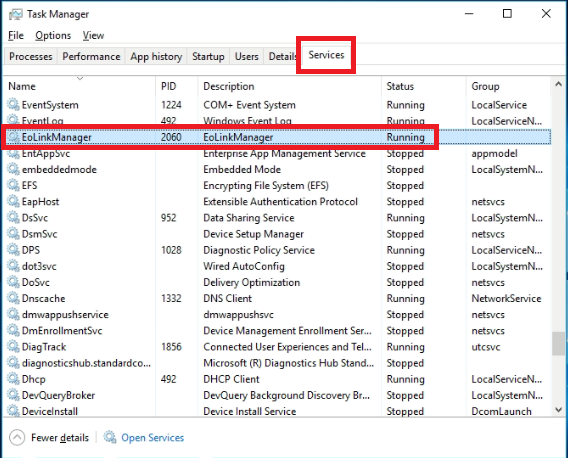
| − | *Notice: Once config is changed, please using Windows Services Manager to restart EoLinkManager service or reboot gateway in order to apply new setting. | + | *<span style="color:#FF0000;">Notice: Once config is modified, please restart EoLinkManager service in Task Manager or reboot gateway in order to apply new setting.</span> |
| − | | + | *[[File:TLS service manager.PNG|RTENOTITLE]] |
| − | {| border="1" cellspacing="1" cellpadding="1" style="width:500px;"
| |
| − | |-
| |
| − | |
| |
| − | [Platform]<br/>InterfaceName=EoLinkReceiver<br/>ServerURL=127.0.0.1<br/>ModuleName=EoLinkManager<br/>SensorName=LightSensor<br/>SerialPort=COM3<br/>ServerPort=1883<br/>Interval=1<br/>#Interval: The time delay between data access round in second.
| |
| − | | |
| − | [Sensors]<br/>NumberOfSensors=2<br/>Sensor0=04016943<br/>Sensor1=0400E889
| |
| − | | |
| − | |}
| |
| − | | |
| − | == Service control ==
| |
| − | | |
| − | '''In Windows'''
| |
| − | | |
| − | Check if EoLinkManager service is running:
| |
| − | | |
| − | *Use Service to check status of EoLinkManager service
| |
| − | | |
| − | Restart EoLinkManager service:
| |
| − | | |
| − | *Use Service to restart EoLinkManager service
| |
| − | | |
| − | Start EoLinkManager service:
| |
| − | | |
| − | *Use Service start EoLinkManager service
| |
| − | | |
| − | Stop EoLinkManager service:
| |
| − | | |
| − | *Use Service stop EoLinkManager service | |
| − | | |
| − | | |
| − | | |
| − | = Grafana Dashboard =
| |
| − | | |
| − | 1. Sign in WISE-PaaS Dashboard using your User ID and Password:
| |
| − | | |
| − | [[File:Tower Light 03-1.png|640x480px|Tower Light 03-1.png]] | |
| − | | |
| − | 2. Create Data Sources
| |
| − | | |
| − | Choose Configuration -> Data Source -> RMM-SimpleJson
| |
| − | | |
| − | [[File:Tower Light create data source1.jpg|RTENOTITLE]]
| |
| − | | |
| − | Edit settings as follow
| |
| | | | |
| − | [[File:Tower Light create data source2.jpg|RTENOTITLE]]
| + | Setting File example: |
| | | | |
| | {| border="1" cellspacing="1" cellpadding="1" style="width:500px;" | | {| border="1" cellspacing="1" cellpadding="1" style="width:500px;" |
| | |- | | |- |
| | | | | | |
| − | Name: RMM-SimpleJson
| + | [Platform]<br/>InterfaceName=EoLinkReceiver<br/>ServerURL=127.0.0.1<br/>ServerPort=1883<br/>ModuleName=EoLinkManager<br/>SensorName=LightSensor<br/>'''<span style="color:#0000FF;">SerialPort=COM3</span>'''<br/>Interval=1<br/><br/>[Sensors]<br/><span style="color:#0000FF;">'''NumberOfSensors=2'''</span><br/>'''<span style="color:#0000FF;">Sensor0=04016943<br/>Sensor1=0400E889</span>''' |
| − | | |
| − | HTTP<br/>URL: [http://168.63.200.38/rmm/v1/grafana/simplejson/ http://168.63.200.38/rmm/v1/grafana/simplejson/]<br/><span style="color:#FF0000;">* Notice: you need to change url for your environment.</span><br/>Access: Server (default)
| |
| − | | |
| − | Auth<br/>Basic Auth : V
| |
| − | | |
| − | Basic Auth Details<br/>User: xxx<br/>Password: xxx<br/><span style="color:#FF0000;">* Notice: you need to assign user and password for your EdgeSense authentication.</span>
| |
| | | | |
| | |} | | |} |
| | | | |
| − | 3. Create Dashboard
| + | <span style="color:#FF0000;">Notice: Please make sure above settings (in blue color) is correct. And please do not change other settings.</span> |
| | | | |
| − | Choose Create -> Import -> Or paste JSON
| + | SerialPort |
| | | | |
| − | Paste content of Tower Light dashboard Grafana Dashboard json, then choose Load.
| + | *Assign serial port which USB receiver (USB300) is using. |
| | | | |
| − | [[File:Tower Light create dashboard1.jpg]]
| + | Interval |
| | | | |
| − | In RMM-EIOT , choose RMM-SimpleJSON , then choose Import to save and apply.
| + | *The time delay between data access round in second. |
| | | | |
| − | [[File:Tower Light create dashboard2.jpg]]
| + | NumberOfSensors |
| | | | |
| | + | *Assign number of Tower Light Sensor module |
| | | | |
| | + | Sensor0 |
| | | | |
| − | <span style="font-size:medium;">2. Drop down “Home” and select Tower Light Board.</span> | + | *Assign id for Tower Light Sensor module. Format is Sensor0=<<MODULE_ID>> |
| | + | *If you have multi Tower Light Sensor module, please start at a number 0 for the first module. |
| | + | *Second module use Sensor1. |
| | | | |
| − | <span style="font-size:medium;"> Board name: '''Advantech EIoT DTOS Tower Light Monitoring'''</span>
| + | == Debug == |
| | | | |
| | + | 1. Check all installed software versions are correct. |
| | | | |
| | + | 2. Check if service is running |
| | | | |
| − | [[File:Tower Light 04-1.png|640x300px|Tower Light 04-1.png]]
| + | *Make sure EoLinkManager service is running. |
| | + | *Make sure WISEAgent service is running. |
| | + | *Make sure APIGateway service is running. |
| | + | *Make sure mosquitto service is running. |
| | | | |
| | + | 3. Check EoLinkManger log file |
| | | | |
| | + | *log files is available at EoLinkManager installed folder, (ex: C:\Program Files (x86)\Advantech\EoLinkManager\logs) |
| | + | *View logs files to check if there are any error messages. |
| | | | |
| | + | 4. Check EoLinkManager configuration |
| | | | |
| | + | *Make sure SerialPort setting is the port number USB receiver (USB300) is using. |
| | + | *Make sure Tower Light Sensor module id is correct and assigned in Sensors section in configuration file. |
| | | | |
| | + | 5. Check if device id of Tower Light Module is listed in Sensor Hub List |
| | | | |
| | + | In web browser and open url : http://<span style="color:#FF0000;">GATEWAY_IP</span>:3000/restapi/WSNManage/SenHub/AllSenHubList |
| | | | |
| − | [[File:Tower Light 05-1.png|640x200px|Tower Light 05-1.png]] | + | *Assign ip address for GATEWAY_IP |
| | + | *ex: [http://127.0.0.1:3000/restapi/WSNManage/SenHub/AllSenHubList http://127.0.0.1:3000/restapi/WSNManage/SenHub/AllSenHubList] |
| | | | |
| | + | Once Tower Light Module is managed by EoLinkManager, its device id will be listed in Sensor Hub List as shown on below picture. |
| | | | |
| | + | [[File:Tower Light senhublist.png|RTENOTITLE]] |
| | | | |
| − | <span style="font-size:medium;">3. You will see the board is showed like this when all lights off:</span>
| + | 6. Check WISE-Agent connection status |
| | | | |
| − | [[File:Tower Light 01 .png|800x480px|Tower Light 01 .png]] | + | *Launch WISE-Agent shortcut in Windows Desktop.<br/>[[File:TLS debug wiseagent shortcut.jpg|RTENOTITLE]] |
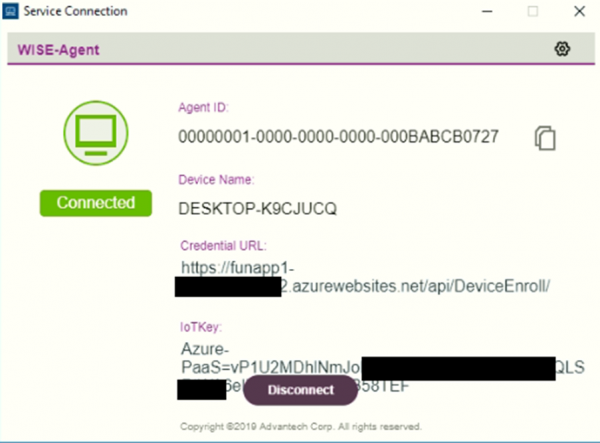
| | + | *Check if WISE-Agent is connected as below picture.<br/>[[File:TLS debug wiseagent connection2.PNG|600px|TLS debug wiseagent connection2.PNG]] |
| | | | |
| | + | 7. Check if sensor data is published to WISE-PaaS/EdgeSense |
| | | | |
| | + | *Use web browser to open WISE-PaaS/EdgeSense web pages. |
| | + | *Go to Device Page and choose the LightSensor device you are using, click on Monitor icon. |
| | + | *In Monitor page, select SenHub , then you can monitor the LightSensor data payload. |
| | | | |
| − | <span style="font-size:medium;">4. You will see the board is showed like this when all lights on:</span>
| + | = Grafana Dashboard = |
| | | | |
| − | [[File:Tower Light 02 .png|800x480px|Tower Light 02 .png]] | + | *<span style="font-size:large;">[[Gantt-chart-for-TLS|A Gantt chart panel for TLS on Grafana]]</span> |
| | | | |
| | | | |
| | | | |
| − | <span style="font-size:medium;">5. Drop down “Tower Light” and select “Edit” to edit the widget’s HTML:</span>
| |
| | | | |
| − | [[File:Tower Light 06-2.png|640x400px|Tower Light 06-2.png]]
| |
| | | | |
| | + | = Release = |
| | | | |
| | + | {| border="1" cellspacing="1" cellpadding="1" style="width: 1492px;" |
| | + | |- |
| | + | | style="text-align: center; width: 55px;" | Version |
| | + | | style="text-align: center; width: 78px;" | Date<br/> |
| | + | | style="text-align: center; width: 85px;" | Platform<br/> |
| | + | | style="text-align: center; width: 89px;" | OS<br/> |
| | + | | style="text-align: center; width: 394px;" | Release Note<br/> |
| | + | | style="text-align: center; width: 759px;" | Download Link<br/> |
| | + | | style="text-align: center; width: 759px;" | Note |
| | + | |- |
| | + | | style="text-align: center; width: 55px;" | 1.0.6 |
| | + | | style="width: 78px; text-align: center;" | 2021/8/23 |
| | + | | style="width: 85px; text-align: center;" | x86_64 CPU<br/> |
| | + | | style="width: 89px; text-align: center;" | Windows 10<br/> |
| | + | | style="width: 394px;" | |
| | + | *Add log message |
| | + | *Watchdog |
| | + | *Improve stability |
| | + | *Verified by <span style="color:#FF0000;">WISE-Agent 1.2.17</span> |
| | | | |
| − | <span style="font-size:medium;">6. Define Tower Light Sensor ID in the widget’s HTML:</span>
| + | | style="width: 759px;" | |
| | + | [https://www.dropbox.com/s/gqwvai9v8x9fjzw/API-GW-2.0.9.exe?dl=0 API-GW 2.0.9] |
| | | | |
| − | [[File:Tower Light 10.png|640x200px|Tower Light 10.png]] | + | [https://www.dropbox.com/s/rkbl747zi02gmzd/EoLinkManager-1.0.6.exe?dl=0 EoLinkManager 1.0.6] |
| | | | |
| | + | [https://www.dropbox.com/s/rzubwa511g8h5x0/MQTTBroker-1.0.6.exe?dl=0 MQTTBroker 1.0.6] |
| | | | |
| | + | USB receiver driver:<br/>[https://www.dropbox.com/s/vi00t4ueb1nwe14/CDM21228_Setup.exe?dl=0 CDM21228_Setup.exe] |
| | | | |
| − | <span style="font-size:medium;">7. RESTful API and HTML request content:</span> | + | | style="width: 759px;" | Notice: If API-GW 2.0.7 is installed in your system, please remove API-GW 2.0.7 first, then install API-GW v2.0.9. Please follow this [[#After_upgrading_API-GW.2C_API-GW_not_running|guide]].<br/> |
| | + | |- |
| | + | | style="text-align: center; width: 55px;" | 1.0.5<br/> |
| | + | | style="width: 78px; text-align: center;" | 2020/6/1<br/> |
| | + | | style="width: 85px; text-align: center;" | x86_64 CPU<br/> |
| | + | | style="width: 89px; text-align: center;" | Windows 10<br/> |
| | + | | style="width: 394px;" | |
| | + | *Fix same Device Name shown in EdgeSense. |
| | + | *Verified by <span style="color:#FF0000;">WISE-Agent 1.2.17</span> |
| | | | |
| − | [[File:Tower Light 08-1.png|640x300px|Tower Light 08-1.png]] | + | | style="width: 759px;" | |
| | + | [https://www.dropbox.com/s/4ou8wsr4hd6a1ku/API-GW-2.0.8.exe?dl=0 API-GW 2.0.8] |
| | | | |
| | + | [https://www.dropbox.com/s/4d3sl03pwlv48pd/EoLinkManager-1.0.5.exe?dl=0 EoLinkManager 1.0.5] |
| | | | |
| | + | [https://www.dropbox.com/s/q7p0d3ctk7pxbez/MQTTBrokerSetup_1.0.4.exe?dl=0 MQTTBrokerSetup 1.0.4] |
| | | | |
| − | <span style="font-size:larger;">Dashboard HTML:</span> | + | USB receiver driver:<br/>[https://www.dropbox.com/s/vi00t4ueb1nwe14/CDM21228_Setup.exe?dl=0 CDM21228_Setup.exe] |
| | | | |
| − | <span style="font-size:larger;">[https://www.dropbox.com/s/mwtz64atix0uavb/Advantech%20EIoT%20DTOS%20Tower%20Light%20Monitoring-Graph-04016943-ADF-20180430.json?dl=0 https://www.dropbox.com/s/mwtz64atix0uavb/Advantech%20EIoT%20DTOS%20Tower%20Light%20Monitoring-Graph-04016943-ADF-20180430.json?dl=0]</span>
| + | | style="width: 759px;" | Notice: If API-GW 2.0.7 is installed in your system, please remove API-GW 2.0.7 first, then install API-GW v2.0.8. Please follow this [[#After_upgrading_API-GW.2C_API-GW_not_running|guide]].<br/> |
| | + | |- |
| | + | | style="text-align: center; width: 55px;" | 1.0.4<br/> |
| | + | | style="width: 78px; text-align: center;" | 2019/12/20<br/> |
| | + | | style="width: 85px; text-align: center;" | x86_64 CPU<br/> |
| | + | | style="width: 89px; text-align: center;" | Windows 10<br/> |
| | + | | style="width: 394px;" | |
| | + | *Add log message |
| | + | *Fix no sensor data received cause lost connection |
| | + | *Verified by <span style="color:#FF0000;">EdgeSense 1.0.106</span> |
| | + | *Verified by <span style="color:#FF0000;">WISE-Agent 1.2.17</span> |
| | | | |
| | + | | style="width: 759px;" | |
| | + | API-GW 2.0.7 |
| | | | |
| | + | EoLinkManager 1.0.4 |
| | | | |
| − | <span style="font-size:larger;">RESTful API: </span>
| + | MQTTBrokerSetup 1.0.4 |
| | | | |
| − | <span style="font-size:larger;">'''[https://portal-rmm-advantech-eiot.wise-paas.com/rmm/v1/grafana/simplejson/query https://portal-rmm.wise-paas.com/rmm/v1/grafana/simplejson/query]'''</span>
| + | USB receiver driver:<br/>CDM21228_Setup.exe |
| | | | |
| − |
| + | | style="width: 759px;" | <br/> |
| | + | |} |
| | | | |
| − | <span style="font-size:larger;">Example:</span>
| + | = Troubleshooting = |
| | | | |
| − | <span style="font-size:larger;">''cache: false''</span>
| + | == After upgrading API-GW, API-GW not running == |
| | | | |
| − | <span style="font-size:larger;">''url: '[https://portal-rmm-advantech-eiot.wise-paas.com/rmm/v1/grafana/simplejson/query' https://portal-rmm.wise-paas.com/rmm/v1/grafana/simplejson/query']''</span>
| + | API-GW v2.0.7 or older version is not able to upgrade to v2.0.8 |
| | | | |
| − | <span style="font-size:larger;">''type: "post",''</span>
| + | Please remove older version API-GW first, then install API-GW v2.0.8 |
| | | | |
| − | <span style="font-size:larger;">''contentType: 'application/json'''</span>
| + | Below steps shows how to cleanly remove API-GW v2.0.7 or older version. |
| | | | |
| − | <span style="font-size:larger;">''dataType: 'json'''</span>
| + | Step-1. Remove API-GW |
| | | | |
| − | <span style="font-size:larger;">''data: '{"timezone":"browser","panelId":2,"range":{"from":"2018-04-09T05:46:51.357Z","to":"2018-04-09T09:46:51.357Z","raw":{"from":"now-6h","to":"now"}},"rangeRaw":{"from":"now-6h","to":"now"},"interval":"20s","intervalMs":20000,"targets":[{"target":"00000001-0000-0000-0017-000004016940|SenHub|/SenData/Light1","device":"00000001-0000-0000-0017-000004016940","plugin":"SenHub","sensor":"/SenData/Light1","refId":"A","type":"table"}],"maxDataPoints":960,"scopedVars":{"__interval":{"text":"20s","value":"20s"},"__interval_ms":{"text":20000,"value":20000}}}'''</span>
| + | [[File:TLS remove app.png|RTENOTITLE]] |
| | | | |
| − | <span style="font-size:larger;">''xhrFields: {withCredentials: true}''</span>
| + | Step-2. Remove service. |
| | | | |
| | + | If API-GW is still listed in service manager as below picture, |
| | | | |
| | + | [[File:TLS apigw in service list.png|RTENOTITLE]] |
| | | | |
| − | <span style="font-size:medium;">8. Lights blinking status for the Tower Light:</span>
| + | Then, use command line with Administrator privileges to run |
| | | | |
| − | [[File:Tower Light 09.png|640x360px|Tower Light 09.png]]
| + | sc delete apigw.exe |
| | | | |
| − | = Release =
| + | [[File:TLS sc delete old apigw service name.png|RTENOTITLE]] |
| − | | |
| − | {| border="1" cellspacing="1" cellpadding="1" style="width: 1492px;"
| |
| − | |-
| |
| − | | style="text-align: center;" | Index
| |
| − | | style="text-align: center;" | Version
| |
| − | | style="text-align: center; width: 76px;" | Date<br/>
| |
| − | | style="text-align: center; width: 85px;" | Platform<br/>
| |
| − | | style="text-align: center; width: 72px;" | OS<br/>
| |
| − | | style="text-align: center; width: 409px;" | Release Note<br/>
| |
| − | | style="text-align: center; width: 732px;" | Download Link<br/>
| |
| − | |-
| |
| − | | style="text-align: center;" | 1
| |
| − | | style="text-align: center;" | 1.0.2
| |
| − | | style="width: 76px; text-align: center;" | 2018//
| |
| − | | style="width: 85px; text-align: center;" | x86_64 CPU<br/>
| |
| − | | style="width: 72px; text-align: center;" | Windows 10<br/>
| |
| − | | style="width: 409px;" |
| |
| − | | style="width: 732px;" |
| |
| − | [file://eossfs/ESS-Release/EdgeSense/Release/Windows/EnOcean/ EoLinkManager 1.0.2] | |
| − | | |
| − | [file://eossfs/ESS-Release/EdgeSense/Release/Windows/MQTTBroker/ MQTTBrokerSetup 1.0.3] | |
| − | | |
| − | USB receiver driver:<br/>[file://eossfs/ESS-Release/EdgeSense/Release/Windows/EnOcean/ CDM21228_Setup.exe]
| |
| − | | |
| − | Grafana dashboard:<br/>[file://eossfs/ESS-Release/EdgeSense/Release/Windows/EnOcean/ Advantech EIoT DTOS Tower Light Monitoring-Graph-04016943-ADF-20180430.json]
| |
| − | | |
| − | Above files are available at local server, please paste file's url in File Explorer to copy file.
| |
| − | | |
| − | |-
| |
| − | | style="text-align: center;" | 2
| |
| − | | style="text-align: center;" | 1.0.3
| |
| − | | style="width: 76px; text-align: center;" | 2019/05/3
| |
| − | | style="width: 85px; text-align: center;" | x86_64 CPU
| |
| − | | style="width: 72px; text-align: center;" | Windows 10
| |
| − | | style="width: 409px;" |
| |
| − | *Run as Windows service
| |
| − | *Support WISE-PaaS/EdgeSense 1.0.98
| |
| − | *Support Grafana 5.4.3
| |
| − | | |
| − | | style="width: 732px;" | | |
| − | [file://eossfs/ESS-Release/EdgeSense/Release/Windows/API-GW/ API-GW 2.0.7]
| |
| − | | |
| − | [file://eossfs/ESS-Release/EdgeSense/Release/Windows/EnOcean/ EoLinkManager 1.0.3]
| |
| − | | |
| − | [file://eossfs/ESS-Release/EdgeSense/Release/Windows/MQTTBroker/ MQTTBrokerSetup 1.0.3]
| |
| − | | |
| − | USB receiver driver:<br/>[file://eossfs/ESS-Release/EdgeSense/Release/Windows/EnOcean/ CDM21228_Setup.exe]
| |
| − | | |
| − | Grafana dashboard:<br/>[file://eossfs/ESS-Release/EdgeSense/Release/Windows/EnOcean/ Advantech EIoT DTOS Tower Light Monitoring-Graph-04016943-ADF-20190503.json]
| |
| − | | |
| − | Above files are available at local server, please paste file's url in File Explorer to copy file.
| |
| − | | |
| − | |-
| |
| − | | style="text-align: center;" | 3
| |
| − | | style="text-align: center;" |
| |
| − | | style="width: 76px; text-align: center;" |
| |
| − | | style="width: 85px; text-align: center;" |
| |
| − | | style="width: 72px; text-align: center;" |
| |
| − | | style="width: 409px;" |
| |
| − | | style="width: 732px;" |
| |
| − | | |
| − | | |
| − | |-
| |
| − | | style="text-align: center;" | 4
| |
| − | | style="text-align: center;" | <br/>
| |
| − | | style="width: 76px; text-align: center;" |
| |
| − | | style="width: 85px; text-align: center;" |
| |
| − | | style="width: 72px; text-align: center;" |
| |
| − | | style="width: 409px;" |
| |
| − | | style="width: 732px;" |
| |
| − | | |
| − | | |
| − | |}
| |
For example, value of third light is 41.
1. Check all installed software versions are correct.
2. Check if service is running
3. Check EoLinkManger log file
4. Check EoLinkManager configuration
5. Check if device id of Tower Light Module is listed in Sensor Hub List
Once Tower Light Module is managed by EoLinkManager, its device id will be listed in Sensor Hub List as shown on below picture.
6. Check WISE-Agent connection status
7. Check if sensor data is published to WISE-PaaS/EdgeSense
Below steps shows how to cleanly remove API-GW v2.0.7 or older version.
Step-1. Remove API-GW
Step-2. Remove service.