Difference between revisions of "IoTGateway/BSP/Linux/iMX6/Mfgtool"
From ESS-WIKI
Alex.cheng (talk | contribs) (update mfg tool information for ROM-7421) |
|||
| Line 1: | Line 1: | ||
<big><big><big>User Guide for using mfgtool</big></big></big> | <big><big><big>User Guide for using mfgtool</big></big></big> | ||
| + | |||
{| align="right" | {| align="right" | ||
| − | + | |- | |
| − | + | | __TOC__ | |
| + | |} | ||
<!-- | <!-- | ||
--> | --> | ||
| + | = Enter recovery mode = | ||
| + | |||
| + | === ROM-5420 === | ||
| − | |||
| − | |||
:Set the correct boot mode, then power on. | :Set the correct boot mode, then power on. | ||
| − | :[[File: | + | :[[File:Rom5420-mfgtool.jpg|200px|Rom5420-mfgtool.jpg]] |
| − | ===ROM-3420=== | + | |
| − | # ATX mode | + | === ROM-3420 === |
| − | #: In power off state,press power key for 5 secs and release | + | |
| − | # AT mode | + | #ATX mode |
| − | #: Press power key ,then plug AC adapter,release power key after 5 secs | + | #:In power off state,press power key for 5 secs and release |
| − | ===Other Projects=== | + | #AT mode |
| + | #:Press power key ,then plug AC adapter,release power key after 5 secs | ||
| + | |||
| + | === ROM-7421 === | ||
| + | |||
| + | :Set eng mode,then power on(1-off,2-on) | ||
| + | :[[File:Rom7421-mfgtool.jpg|200px|Rom7421-mfgtool.jpg]] | ||
| + | |||
| + | === Other Projects === | ||
| + | |||
:Set eng mode,then power on(1-off,2-on) | :Set eng mode,then power on(1-off,2-on) | ||
| − | :[[File: | + | :[[File:Other project mfgtool.jpg|200px|Other project mfgtool.jpg]] |
| + | |||
| + | = Connect the OTG to the PC = | ||
| − | |||
:After connecting to PC, a HID-compliant device will be shown in the Device | :After connecting to PC, a HID-compliant device will be shown in the Device | ||
| − | :[[File: | + | :[[File:Dm mfgtool.jpg|500px|Dm mfgtool.jpg]] |
| + | |||
| + | = Modify config file = | ||
| + | |||
| + | == modify cfg.ini == | ||
| − | |||
| − | |||
:mfgtools/cfg.ini | :mfgtools/cfg.ini | ||
| + | |||
| + | === ROM-5420 === | ||
| + | |||
[profiles] | [profiles] | ||
chip = Linux | chip = Linux | ||
| Line 40: | Line 58: | ||
image = fsl-image-x11-imx6qrom5420-20141218174618.rootfs.sdcard | image = fsl-image-x11-imx6qrom5420-20141218174618.rootfs.sdcard | ||
| − | ==which operation you want to do== | + | === ROM-7421 === |
| + | |||
| + | [profiles] | ||
| + | chip = Linux | ||
| + | |||
| + | [platform] | ||
| + | board = SabreSD | ||
| + | |||
| + | [LIST] | ||
| + | name = ADV u-boot | ||
| + | |||
| + | [variable] | ||
| + | dtb = imx6qp-rom7421-a1 | ||
| + | mmc = 0 | ||
| + | image = fsl-image-qt5-imx6qprom7421a1-20170116192833.rootfs.sdcard | ||
| + | |||
| + | == which operation you want to do == | ||
| + | |||
[LIST] | [LIST] | ||
name = | name = | ||
| Line 47: | Line 82: | ||
ADV u-boot update u-boot | ADV u-boot update u-boot | ||
ADV adv-loader update adv-loader | ADV adv-loader update adv-loader | ||
| − | ==define config variable== | + | |
| + | == define config variable == | ||
| + | |||
[variable] | [variable] | ||
dtb = (name of dtb file) | dtb = (name of dtb file) | ||
mmc = ( “0” means “emmc” ,”1” means “SD Card” .) | mmc = ( “0” means “emmc” ,”1” means “SD Card” .) | ||
image = (If you want to update whole image,fill the image file name ) | image = (If you want to update whole image,fill the image file name ) | ||
| + | |||
After updating image | After updating image | ||
| + | |||
#then power on system | #then power on system | ||
#perform “resize2fs /dev/mmcblk0p2” | #perform “resize2fs /dev/mmcblk0p2” | ||
#restart system. | #restart system. | ||
| − | =Running mfgtool and update= | + | = Running mfgtool and update = |
| + | |||
running the MfgTool2.exe and update | running the MfgTool2.exe and update | ||
| − | :[[File:Mfgtool.jpg | + | |
| + | :[[File:Mfgtool.jpg|400px|Mfgtool.jpg]] | ||
| + | |||
#If you can’t running mfgtool2.exe, you can check MfgTool.log | #If you can’t running mfgtool2.exe, you can check MfgTool.log | ||
#Click “Start”,you can get information form debug console | #Click “Start”,you can get information form debug console | ||
| − | #:[[File:Debug mfgtool.jpg | + | #:[[File:Debug mfgtool.jpg|600px|Debug mfgtool.jpg]] |
#After update finish,it will be shown below | #After update finish,it will be shown below | ||
| − | #:[[File:Mfgtool2.jpg | + | #:[[File:Mfgtool2.jpg|400px|Mfgtool2.jpg]] |
#Click “Exit” to terminate the application. | #Click “Exit” to terminate the application. | ||
Revision as of 03:55, 3 February 2017
User Guide for using mfgtool
Enter recovery mode
ROM-5420
- Set the correct boot mode, then power on.


ROM-3420
- ATX mode
- In power off state,press power key for 5 secs and release
- AT mode
- Press power key ,then plug AC adapter,release power key after 5 secs
ROM-7421
- Set eng mode,then power on(1-off,2-on)
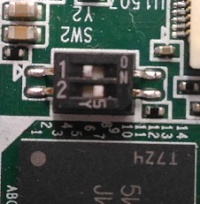

Other Projects
- Set eng mode,then power on(1-off,2-on)


Connect the OTG to the PC
- After connecting to PC, a HID-compliant device will be shown in the Device


Modify config file
modify cfg.ini
- mfgtools/cfg.ini
ROM-5420
[profiles]
chip = Linux

[platform]
board = SabreSD

[LIST]
name = ADV u-boot

[variable]
dtb = imx6dl-rom5420-b1
mmc = 0
image = fsl-image-x11-imx6qrom5420-20141218174618.rootfs.sdcard
ROM-7421
[profiles]
chip = Linux

[platform]
board = SabreSD

[LIST]
name = ADV u-boot

[variable]
dtb = imx6qp-rom7421-a1
mmc = 0
image = fsl-image-qt5-imx6qprom7421a1-20170116192833.rootfs.sdcard
which operation you want to do
[LIST]
name =
ADV Image 		update whole image(including rootfs)
ADV kernel		update zImage and dtb file
ADV u-boot		update u-boot
ADV adv-loader		update adv-loader
define config variable
[variable]
dtb = (name of dtb file)
mmc = ( “0” means “emmc” ,”1” means “SD Card” .)
image = (If you want to update whole image,fill the image file name )
After updating image
- then power on system
- perform “resize2fs /dev/mmcblk0p2”
- restart system.
Running mfgtool and update
running the MfgTool2.exe and update

- If you can’t running mfgtool2.exe, you can check MfgTool.log
- Click “Start”,you can get information form debug console
- After update finish,it will be shown below
- Click “Exit” to terminate the application.

