Difference between revisions of "EPC-R3710 user guide"
| Line 1: | Line 1: | ||
| − | |||
| − | + | == '''資源特性(Features)''' == | |
| − | |||
| − | |||
| − | |||
| − | |||
| − | |||
| − | |||
| − | |||
| − | |||
| − | |||
| − | + | *Rockchip Arm® Cortex®-A72 RK3399 up to 1.8 GHz | |
| + | *Onboard LPDDR4 2GB | ||
| + | *HDMI 1920x1080 at 60Hz, 1 Dual Channel 24 bit LVDS | ||
| + | *1 2-wire RS-232, 1 USB3.0, 1 USB2.0, 1 Micro SD, 1 Mic. in / Line out | ||
| + | *1 mini-PCIe for 3G/4G | ||
| + | *UIO expansion 3 USB2.0, 8 GPIO, 2 RS232 2/2-wires UART, 1 I2C | ||
| + | *Supports Debian9/10 and Android7.1/10.0 | ||
| + | *Support I/O Expansions by UIO40-Express I/O boards, please refer to page #3 for more information | ||
| − | + | == '''訂購資訊(Ordering Information)''' == | |
| − | + | [[File:RSB-3710 orderinfo2021-11-02 100552.jpg|RTENOTITLE]] | |
| − | + | | |
| − | + | == '''规格(Specifications)''' == | |
| − | + | == '''接口布局和尺寸(Layout and Sizes)''' == | |
| − | + | [[File:EPC-R3710 Case.PNG|RTENOTITLE]] | |
| − | + | | |
| − | + | === '''接口布局圖 Board Dimension Layout ''' === | |
| − | + | [[File:RSB-3710 product pic11 2021-11-02 100745.jpg|RTENOTITLE]] | |
| − | + | [[File:RSB-3710 product pic22 2021-11-02 100837.jpg|RTENOTITLE]] | |
| − | + | [[File:RSB-3710 product pic33 2021-11-02 100904.jpg|RTENOTITLE]] | |
| − | + | | |
| − | + | == ''' Connector List''' == | |
| − | |||
| − | |||
| − | |||
| − | |||
| − | |||
| − | |||
| − | |||
| − | |||
| − | |||
| − | |||
| − | |||
| − | |||
| − | |||
| − | |||
| − | |||
| − | |||
| − | |||
| − | |||
| − | |||
| − | |||
| − | |||
| − | |||
| − | |||
| − | |||
| − | |||
| − | |||
| − | |||
| − | |||
| − | |||
| − | |||
| − | |||
| − | |||
| − | |||
| − | |||
| − | |||
| − | |||
| − | |||
| − | |||
| − | |||
| − | |||
| − | |||
| − | |||
| − | |||
| − | |||
| − | |||
| − | |||
| − | |||
| − | |||
| − | |||
| − | |||
| − | |||
| − | |||
| − | |||
| − | |||
| − | |||
| − | |||
| − | |||
| − | |||
| − | |||
| − | |||
| − | |||
| − | |||
| − | |||
| − | |||
| − | |||
| − | |||
| − | |||
| − | |||
| − | |||
| − | |||
| − | |||
| − | |||
| − | |||
| − | |||
| − | |||
| − | |||
| − | |||
| − | |||
| − | |||
| − | |||
| − | |||
| − | |||
| − | |||
| − | |||
| − | |||
| − | + | [[File:RSB-3710 Jumper and Connector Locations 2021-11-02 101526.jpg|RTENOTITLE]] | |
| − | < | + | {| border="1" cellpadding="1" cellspacing="1" style="width: 307px;" |
| + | |- | ||
| + | | <tbody> | ||
| + | |- | ||
| + | | <tbody> | ||
| + | |- | ||
| + | | style="width: 57px;" | BAT | ||
| + | | style="width: 237px;" | RTC Battery Connector | ||
| + | |- | ||
| + | | style="width: 57px;" | HDMI | ||
| + | | style="width: 237px;" | HDMI1 CONN | ||
| + | |- | ||
| + | | style="width: 57px;" | BL | ||
| + | | style="width: 237px;" | LVDS BKL CONN | ||
| + | |- | ||
| + | | style="width: 57px;" | LVDS | ||
| + | | style="width: 237px;" | LVDS CONN | ||
| + | |- | ||
| + | | style="width: 57px;" | LAN1 | ||
| + | | style="width: 237px;" | LAN | ||
| + | |- | ||
| + | | style="width: 57px;" | LAN2 | ||
| + | | style="width: 237px;" | LAN | ||
| + | |- | ||
| + | | style="width: 57px;" | MINIPCIE | ||
| + | | style="width: 237px;" | MINI PCIE 52P | ||
| + | |- | ||
| + | | style="width: 57px;" | SIM | ||
| + | | style="width: 237px;" | Nano SIM Card | ||
| + | |- | ||
| + | | style="width: 57px;" | AUDIO | ||
| + | | style="width: 237px;" | Audio PIN Header | ||
| + | |- | ||
| + | | style="width: 57px;" | USB1 | ||
| + | | style="width: 237px;" | USB CONN | ||
| + | |- | ||
| + | | style="width: 57px;" | COM2/Debug | ||
| + | | style="width: 237px;" | COM2 | ||
| + | |- | ||
| + | | style="width: 57px;" | SD | ||
| + | | style="width: 237px;" | SD Slot | ||
| + | |- | ||
| + | | style="width: 57px;" | OTG | ||
| + | | style="width: 237px;" | USB | ||
| + | |- | ||
| + | | style="width: 57px;" | BTN | ||
| + | | style="width: 237px;" | Power BTN pin header | ||
| + | |- | ||
| + | | style="width: 57px;" | RST | ||
| + | | style="width: 237px;" | Reset Button | ||
| + | |- | ||
| + | | style="width: 57px;" | DCIN1 | ||
| + | | style="width: 237px;" | 12V DC Jack | ||
| + | |- | ||
| + | | style="width: 57px;" | LED | ||
| + | | style="width: 237px;" | LED | ||
| + | |- | ||
| + | | style="width: 57px;" | CN11 | ||
| + | | style="width: 237px;" | UIO1 | ||
| + | |- | ||
| + | | style="width: 57px;" | CN12 | ||
| + | | style="width: 237px;" | UIO2 | ||
| + | |- | ||
| + | | </tbody> | ||
| + | |- | ||
| + | | </tbody> | ||
| + | |} | ||
| − | + | | |
| − | |||
| − | |||
| − | |||
| − | |||
| − | |||
| − | |||
| − | |||
| − | |||
| − | |||
| − | |||
| − | |||
| − | |||
| − | |||
| − | |||
| − | |||
| − | |||
| − | |||
| − | |||
| − | |||
| − | |||
| − | + | === '''接口引脚定義 (Pin definitions)''' === | |
| − | < | + | *<a href="BAT">BAT</a> |
| + | *<a href="HDMI1">HDMI1</a> | ||
| + | *<a href="BL">BL</a> | ||
| + | *<a href="LVDS">LVDS</a> | ||
| + | *<a href="LAN1%2C%20LAN2">LAN1, LAN2</a> | ||
| + | *<a href="MINIPCIE">MINIPCIE</a> | ||
| + | *<a href="SIM">SIM</a> | ||
| + | *<a href="Audio">Audio</a> | ||
| + | *<a href="USB1">USB1</a> | ||
| + | *<a href="COM2%2FDebug">COM2/Debug</a> | ||
| + | *<a href="SD">SD</a> | ||
| + | *<a href="OTG">OTG</a> | ||
| + | *<a href="BTN">BTN</a> | ||
| + | *<a href="RST">RST</a> | ||
| + | *<a href="DCIN1">DCIN1</a> | ||
| + | *<a href="LED">LED</a> | ||
| + | *<a href="CN11">CN11</a> | ||
| + | *<a href="CN12">CN12</a> | ||
| + | *<a href="RSB-3710%20Jumper%20List">RSB-3710_Jumper List</a> | ||
| − | + | === '''机械尺寸 ('''Mechanical Characteristics) === | |
| − | + | [[File:RSB-3710 Mechanical 2021-11-02 102727.jpg|RTENOTITLE]] | |
| − | + | == '''快速入门 (Quick Start)''' == | |
| − | + | === '''系统下载 (OS Download)''' === | |
| − | < | + | <a alt="<a alt="[https://pan.baidu.com/s/1VOerXjiKg1pgvy0ZsJOErw https://pan.baidu.com/s/1VOerXjiKg1pgvy0ZsJOErw]" href="[https://pan.baidu.com/s/1VOerXjiKg1pgvy0ZsJOErw https://pan.baidu.com/s/1VOerXjiKg1pgvy0ZsJOErw]" title="[https://pan.baidu.com/s/1VOerXjiKg1pgvy0ZsJOErw https://pan.baidu.com/s/1VOerXjiKg1pgvy0ZsJOErw]">[https://pan.baidu.com/s/1VOerXjiKg1pgvy0ZsJOErw https://pan.baidu.com/s/1VOerXjiKg1pgvy0ZsJOErw]</a>" href="<a alt="[https://pan.baidu.com/s/1VOerXjiKg1pgvy0ZsJOErw https://pan.baidu.com/s/1VOerXjiKg1pgvy0ZsJOErw]" href="[https://pan.baidu.com/s/1VOerXjiKg1pgvy0ZsJOErw https://pan.baidu.com/s/1VOerXjiKg1pgvy0ZsJOErw]" title="[https://pan.baidu.com/s/1VOerXjiKg1pgvy0ZsJOErw https://pan.baidu.com/s/1VOerXjiKg1pgvy0ZsJOErw]">[https://pan.baidu.com/s/1VOerXjiKg1pgvy0ZsJOErw https://pan.baidu.com/s/1VOerXjiKg1pgvy0ZsJOErw]</a>" title="<a alt="[https://pan.baidu.com/s/1VOerXjiKg1pgvy0ZsJOErw https://pan.baidu.com/s/1VOerXjiKg1pgvy0ZsJOErw]" href="[https://pan.baidu.com/s/1VOerXjiKg1pgvy0ZsJOErw https://pan.baidu.com/s/1VOerXjiKg1pgvy0ZsJOErw]" title="[https://pan.baidu.com/s/1VOerXjiKg1pgvy0ZsJOErw https://pan.baidu.com/s/1VOerXjiKg1pgvy0ZsJOErw]">[https://pan.baidu.com/s/1VOerXjiKg1pgvy0ZsJOErw https://pan.baidu.com/s/1VOerXjiKg1pgvy0ZsJOErw]</a>">Baidu for Android 7.1.2</a> '''提取码:'''1r5f |
| − | |||
| − | |||
| − | |||
| − | |||
| − | |||
| − | |||
| − | |||
| − | |||
| − | |||
| − | |||
| − | |||
| − | |||
| − | |||
| − | |||
| − | |||
| − | |||
| − | |||
| − | |||
| − | |||
| − | |||
| − | |||
| − | |||
| − | |||
| − | |||
| − | |||
| − | |||
| − | |||
| − | |||
| − | |||
| − | |||
| − | |||
| − | |||
| − | |||
| − | |||
| − | |||
| − | |||
| − | |||
| − | |||
| − | |||
| − | |||
| − | |||
| − | |||
| − | |||
| − | + | 'Android''系统 (Android OS)'''''' ''' | |
| − | + | {| border="1" cellpadding="0" cellspacing="0" style="width: 994px;" | |
| + | |- | ||
| + | | <tbody> | ||
| + | |- | ||
| + | | <tbody> | ||
| + | |- | ||
| + | | | ||
| + | '''Git BSP Tag Version''' | ||
| − | + | | style="width: 72px;" | | |
| − | + | '''Product''' | |
| − | |||
| − | |||
| − | |||
| − | |||
| − | |||
| − | |||
| − | |||
| − | |||
| − | |||
| − | |||
| − | |||
| − | |||
| − | |||
| − | |||
| − | |||
| − | |||
| − | |||
| − | |||
| − | |||
| − | |||
| − | |||
| − | |||
| − | |||
| − | |||
| − | |||
| − | |||
| − | |||
| − | |||
| − | |||
| − | |||
| − | |||
| − | |||
| − | |||
| − | |||
| − | |||
| − | |||
| − | |||
| − | |||
| − | |||
| − | |||
| − | |||
| − | |||
| − | + | | style="width: 287px;" | '''BSP/Image''' | |
| + | | style="width: 73px;" | | ||
| + | '''Date''' | ||
| − | + | | style="width: 101px;" | | |
| + | '''Alpha Release''' | ||
| − | + | | style="width: 102px;" | | |
| + | '''Beta Release''' | ||
| − | + | | style="width: 100px;" | | |
| + | '''MP Release''' | ||
| − | + | | style="width: 110px;" | | |
| + | '''Release Note''' | ||
| − | + | |- | |
| + | | style="text-align: center;" | V1193 | ||
| + | | style="width: 72px;" | RSB-3710 | ||
| + | | style="width: 287px;" | RK3399_N7_AIV1193_rsb_3710_2021-04-20.tgz | ||
| + | | style="width: 73px;" | 2021-04-20 | ||
| + | | style="width: 101px;" | | ||
| + | | style="width: 102px;" | | ||
| + | | style="text-align: center; width: 100px;" | V | ||
| + | | style="width: 110px;" | | ||
| + | |- | ||
| + | | </tbody> | ||
| + | |- | ||
| + | | </tbody> | ||
| + | |} | ||
| − | + | 'Linux''系统 (Linux OS)'''''' ''' | |
| − | < | + | <a alt="<a alt="[https://pan.baidu.com/s/1Ht2OzxW4NgaZC0Gf69ikIA https://pan.baidu.com/s/1Ht2OzxW4NgaZC0Gf69ikIA]" href="[https://pan.baidu.com/s/1Ht2OzxW4NgaZC0Gf69ikIA https://pan.baidu.com/s/1Ht2OzxW4NgaZC0Gf69ikIA]" title="[https://pan.baidu.com/s/1Ht2OzxW4NgaZC0Gf69ikIA https://pan.baidu.com/s/1Ht2OzxW4NgaZC0Gf69ikIA]">[https://pan.baidu.com/s/1Ht2OzxW4NgaZC0Gf69ikIA https://pan.baidu.com/s/1Ht2OzxW4NgaZC0Gf69ikIA]</a>" href="<a alt="[https://pan.baidu.com/s/1Ht2OzxW4NgaZC0Gf69ikIA https://pan.baidu.com/s/1Ht2OzxW4NgaZC0Gf69ikIA]" href="[https://pan.baidu.com/s/1Ht2OzxW4NgaZC0Gf69ikIA https://pan.baidu.com/s/1Ht2OzxW4NgaZC0Gf69ikIA]" title="[https://pan.baidu.com/s/1Ht2OzxW4NgaZC0Gf69ikIA https://pan.baidu.com/s/1Ht2OzxW4NgaZC0Gf69ikIA]">[https://pan.baidu.com/s/1Ht2OzxW4NgaZC0Gf69ikIA https://pan.baidu.com/s/1Ht2OzxW4NgaZC0Gf69ikIA]</a>" title="<a alt="[https://pan.baidu.com/s/1Ht2OzxW4NgaZC0Gf69ikIA https://pan.baidu.com/s/1Ht2OzxW4NgaZC0Gf69ikIA]" href="[https://pan.baidu.com/s/1Ht2OzxW4NgaZC0Gf69ikIA https://pan.baidu.com/s/1Ht2OzxW4NgaZC0Gf69ikIA]" title="[https://pan.baidu.com/s/1Ht2OzxW4NgaZC0Gf69ikIA https://pan.baidu.com/s/1Ht2OzxW4NgaZC0Gf69ikIA]">[https://pan.baidu.com/s/1Ht2OzxW4NgaZC0Gf69ikIA https://pan.baidu.com/s/1Ht2OzxW4NgaZC0Gf69ikIA]</a>">Baidu link for Debian10</a> Password:nvpp |
| − | + | {| border="1" cellpadding="0" cellspacing="0" | |
| + | |- | ||
| + | | <tbody> | ||
| + | |- | ||
| + | | <tbody> | ||
| + | |- | ||
| + | | | ||
| + | '''Git BSP Tag Version''' | ||
| − | + | | | |
| + | '''Product''' | ||
| − | + | | '''BSP/Image''' | |
| − | + | | | |
| − | + | '''Date''' | |
| + | |||
| + | | | ||
| + | '''Alpha Release''' | ||
| + | |||
| + | | | ||
| + | '''Beta Release''' | ||
| + | |||
| + | | | ||
| + | '''MP Release''' | ||
| + | |||
| + | | | ||
| + | '''Release Note''' | ||
| + | |||
| + | |- | ||
| + | | style="text-align: center;" | DIV251013 | ||
| + | | RSB-3710 | ||
| + | | RSB3710A2AIM20DIV251013_2021-04-15.img.tgz | ||
| + | | 2021-04-15 | ||
| + | | | ||
| + | | style="text-align: center;" | V | ||
| + | | | ||
| + | | <a alt="<a alt="[http://ess-wiki.advantech.com.tw/wiki/images/e/e8/RSB-3710_Debian10_Release_note_2021-04-15.pdf http://ess-wiki.advantech.com.tw/wiki/images/e/e8/RSB-3710_Debian10_Release_note_2021-04-15.pdf]" href="[http://ess-wiki.advantech.com.tw/wiki/images/e/e8/RSB-3710_Debian10_Release_note_2021-04-15.pdf http://ess-wiki.advantech.com.tw/wiki/images/e/e8/RSB-3710_Debian10_Release_note_2021-04-15.pdf]" title="[http://ess-wiki.advantech.com.tw/wiki/images/e/e8/RSB-3710_Debian10_Release_note_2021-04-15.pdf http://ess-wiki.advantech.com.tw/wiki/images/e/e8/RSB-3710_Debian10_Release_note_2021-04-15.pdf]">[http://ess-wiki.advantech.com.tw/wiki/images/e/e8/RSB-3710_Debian10_Release_note_2021-04-15.pdf http://ess-wiki.advantech.com.tw/wiki/images/e/e8/RSB-3710_Debian10_Release_note_2021-04-15.pdf]</a>" href="<a alt="[http://ess-wiki.advantech.com.tw/wiki/images/e/e8/RSB-3710_Debian10_Release_note_2021-04-15.pdf http://ess-wiki.advantech.com.tw/wiki/images/e/e8/RSB-3710_Debian10_Release_note_2021-04-15.pdf]" href="[http://ess-wiki.advantech.com.tw/wiki/images/e/e8/RSB-3710_Debian10_Release_note_2021-04-15.pdf http://ess-wiki.advantech.com.tw/wiki/images/e/e8/RSB-3710_Debian10_Release_note_2021-04-15.pdf]" title="[http://ess-wiki.advantech.com.tw/wiki/images/e/e8/RSB-3710_Debian10_Release_note_2021-04-15.pdf http://ess-wiki.advantech.com.tw/wiki/images/e/e8/RSB-3710_Debian10_Release_note_2021-04-15.pdf]">[http://ess-wiki.advantech.com.tw/wiki/images/e/e8/RSB-3710_Debian10_Release_note_2021-04-15.pdf http://ess-wiki.advantech.com.tw/wiki/images/e/e8/RSB-3710_Debian10_Release_note_2021-04-15.pdf]</a>" title="<a alt="[http://ess-wiki.advantech.com.tw/wiki/images/e/e8/RSB-3710_Debian10_Release_note_2021-04-15.pdf http://ess-wiki.advantech.com.tw/wiki/images/e/e8/RSB-3710_Debian10_Release_note_2021-04-15.pdf]" href="[http://ess-wiki.advantech.com.tw/wiki/images/e/e8/RSB-3710_Debian10_Release_note_2021-04-15.pdf http://ess-wiki.advantech.com.tw/wiki/images/e/e8/RSB-3710_Debian10_Release_note_2021-04-15.pdf]" title="[http://ess-wiki.advantech.com.tw/wiki/images/e/e8/RSB-3710_Debian10_Release_note_2021-04-15.pdf http://ess-wiki.advantech.com.tw/wiki/images/e/e8/RSB-3710_Debian10_Release_note_2021-04-15.pdf]">[http://ess-wiki.advantech.com.tw/wiki/images/e/e8/RSB-3710_Debian10_Release_note_2021-04-15.pdf http://ess-wiki.advantech.com.tw/wiki/images/e/e8/RSB-3710_Debian10_Release_note_2021-04-15.pdf]</a>">Release Note</a> | ||
| + | |- | ||
| + | | </tbody> | ||
| + | |- | ||
| + | | </tbody> | ||
| + | |} | ||
| + | |||
| + | | ||
| + | |||
| + | == '''Android 燒錄方法 (Android Flash eMMC Method) ''' == | ||
| + | |||
| + | '''1. 請先準備一條 mirco USB 線材 和 Debug Cable ''' | ||
| + | |||
| + | ''' mirco USB''' | ||
| + | |||
| + | | ||
| + | |||
| + | [[File:RSB-3710 mirco usb 2021-11-02 143011.jpg|RTENOTITLE]] | ||
| + | |||
| + | | ||
| + | |||
| + | '''Debug Cable ''' | ||
| − | + | [[File:RSB-3710 debug cable 2021-11-02 144650.jpg|RTENOTITLE]] | |
| + | |||
| − | + | 2. 插入 RSB-3710 的OTG port | |
| − | |||
| − | |||
| − | + | [[File:RSB-3710 OTG USBcable 2021-11-02 143356.jpg|RTENOTITLE]] | |
| + | |||
| − | + | 連接 Debug cable | |
| − | |||
| − | |||
| − | + | [[File:RSB-3710 debug and debug port 1 2021-11-02 145203.jpg|RTENOTITLE]] | |
| + | |||
| − | + | '''2. 設定終端機(Set Debug Terminal) ''' | |
| − | + | Debug 串口調試 (Debug port Setting) | |
| − | <pre> | + | 以 Tera Term 为例介绍如何使用串口调试功能 |
| − | + | <pre> Baud Rate波特率:115200 | |
Data 数据位:8 | Data 数据位:8 | ||
Parity 奇偶校验:无 | Parity 奇偶校验:无 | ||
| Line 306: | Line 273: | ||
Flow Control流控:无</pre> | Flow Control流控:无</pre> | ||
| − | + | : | |
| − | |||
| − | |||
| − | + | Tera Term Tool | |
| − | + | [[File:TeraTerm 2021-09-10 140930n.jpg|RTENOTITLE]] | |
| − | + | [[File:TeraTerm12021-09-10 141114n.jpg|RTENOTITLE]] | |
| − | + | | |
| − | + | Note: | |
| − | + | Check the Sriel port in Device Manager (查看PC端的串口号): | |
| − | + | if you can not identify the Serial device , please check your serial driver. | |
| − | + | | |
| − | + | 3.打開燒錄軟體 | |
| − | + | [[File:RSB-3710 android tool 2021-11-02 150159.jpg|RTENOTITLE]] | |
| − | + | | |
| − | + | 4. 打開電源 | |
| − | + | 5. 在終端機上可看到Debug 訊息, 按下'''"Ctrl + C" '''組合鍵. 進入u-boot | |
| − | + | [[File:RSB-3710 CtrlC uboot 2021-11-02 150842.jpg|RTENOTITLE]] | |
| − | + | | |
| − | + | 6. 在u-boot ,輸入'''"loader" ''' 可進入燒錄模式 , Android tool 會同時顯示 '''"Found One MASKROM Device " ''' | |
| − | + | [[File:RSB-3710 android loader 2022-01-20 154115.jpg|RTENOTITLE]] | |
| − | + | | |
| − | + | 7. 在RKDevTool 按下 "Run" ,可進行燒錄. | |
| − | + | [[File:RSB-3710 Run RKDevTool 2021-11-02 160456.jpg|RTENOTITLE]] | |
| − | + | | |
| − | + | 8. 燒錄完畢 | |
| − | + | [[File:RSB-3710 finish RKDevTool 2021-11-02 160931.jpg|RTENOTITLE]] | |
| − | + | | |
| − | + | 9. 重新拔插電源, 讓RSB-3710 重新開機 ,接上HDMI ,可顯示安卓的桌面. | |
| − | + | [[File:RSB-3710 Android desktop pic.png|RTENOTITLE]] | |
| − | + | | |
| − | + | == '''Linux 燒錄方法 (Linux Flash eMMC Method) ''' == | |
| − | + | '''1. 請先準備一條 mirco USB 線材 和 Debug Cable ''' | |
| − | + | ''' mirco USB''' | |
| − | + | [[File:RSB-3710 mirco usb 2021-11-02 143011.jpg|RTENOTITLE]] | |
| − | + | | |
| − | + | '''Debug Cable ''' | |
| − | + | [[File:RSB-3710 debug cable 2021-11-02 144650.jpg|RTENOTITLE]] | |
| − | + | | |
| − | + | '''2. 插入 RSB-3710 的OTG port ''' | |
| − | <pre> | + | [[File:RSB-3710 OTG USBcable 2021-11-02 143356.jpg|RTENOTITLE]] |
| − | + | ||
| + | | ||
| + | |||
| + | '''連接 Debug cable ''' | ||
| + | |||
| + | [[File:RSB-3710 debug and debug port 1 2021-11-02 145203.jpg|RTENOTITLE]] | ||
| + | |||
| + | | ||
| + | |||
| + | '''3. 設定終端機(Set Debug Terminal) ''' | ||
| + | |||
| + | Debug 串口調試 (Debug port Setting) | ||
| + | |||
| + | 以 Tera Term 为例介绍如何使用串口调试功能 | ||
| + | <pre> Baud Rate波特率:115200 | ||
Data 数据位:8 | Data 数据位:8 | ||
Parity 奇偶校验:无 | Parity 奇偶校验:无 | ||
| Line 389: | Line 368: | ||
Flow Control流控:无</pre> | Flow Control流控:无</pre> | ||
| − | + | : | |
| − | |||
| − | |||
| − | |||
| − | |||
| − | + | Tera Term Tool | |
| − | + | [[File:TeraTerm 2021-09-10 140930n.jpg|RTENOTITLE]] | |
| − | + | [[File:TeraTerm12021-09-10 141114n.jpg|RTENOTITLE]] | |
| − | + | Note: | |
| − | + | 查看PC端的串口号(Check the Sriel port in Device Manager) : | |
| − | + | 如果沒有找到 請先確認是否有安裝驅動(if you can not identify the Serial device , please check your serial driver.) | |
| − | + | | |
| − | + | 3.打開燒錄軟體 | |
| − | + | [[File:RSB-3710 RKDevTool Debian 2021-11-02 171049.jpg|RTENOTITLE]] | |
| − | + | | |
| − | + | 4. 打開電源 | |
| − | + | 5. 在終端機上可看到Debug 訊息, 按下'''"Ctrl + C" '''組合鍵. 進入u-boot | |
| − | + | [[File:RSB-3710 CtrlC uboot 2021-11-02 150842.jpg|RTENOTITLE]] | |
| − | + | 6. 在u-boot ,輸入'''"rbrom " ''' 可進入燒錄模式 , Android tool 會同時顯示 '''"Found One MASKROM Device " ''' | |
| − | + | [[File:RSB-3710 rbrom 2021-11-02 151430.jpg|RTENOTITLE]] | |
| − | + | | |
| − | + | 7. 清除後,重新上電,會直接進入 "Found One MASKROM Device" 燒錄模式 | |
| − | + | | |
| − | + | | |
| − | + | | |
| − | + | 8. 在RKDevTool 按下 "Run" ,可進行燒錄. | |
| − | + | [[File:RSB-3710 Run RKDevTool 2021-11-02 160456.jpg|RTENOTITLE]] | |
| − | + | | |
| − | + | 9. 燒錄完畢 | |
| − | + | [[File:RSB-3710 finish RKDevTool 2021-11-02 160931.jpg|RTENOTITLE]] | |
| − | + | 10. 重新拔插電源, 讓RSB-3710 重新開機 ,接上HDMI ,可顯示Debian的桌面. | |
| − | + | [[File:RSB-3710 Debian Screenshot from 2022-01-20 06-54-41.png|RTENOTITLE]] | |
| − | + | == '''系统的基本使用(Linux System Basic Operating Method)''' == | |
| − | + | === '''Display Setting (RSB-3710)''' === | |
| − | |||
| − | |||
| − | |||
| − | |||
| − | |||
| − | |||
| − | |||
| − | |||
| − | |||
| − | |||
| − | |||
| − | |||
| − | |||
| − | |||
| − | |||
| − | |||
| − | |||
| − | |||
| − | |||
| − | |||
| − | |||
| − | |||
| − | |||
| − | |||
| − | |||
| − | |||
| − | |||
| − | + | {| border="1" cellpadding="1" cellspacing="1" style="width: 476px;" | |
| − | + | |- | |
| − | + | | lvds | |
| − | + | | style="width: 436px;" | lvds-g070vw01; lvds-g150xgel05; lvds-g215hvn01 | |
| − | + | |- | |
| − | + | | hdmi | |
| − | + | | style="width: 436px;" | hdmi-default | |
| − | + | |- | |
| − | + | | dp | |
| − | + | | style="width: 436px;" | dp-default | |
| − | + | |} | |
| − | |||
| − | |||
| − | |||
| − | |||
| − | |||
| − | |||
| − | |||
| − | |||
| − | |||
| − | |||
| − | |||
| − | |||
| − | |||
| − | |||
| − | |||
| − | |||
| − | |||
| − | |||
| − | |||
| − | |||
| − | |||
| − | |||
| − | |||
| − | |||
| − | |||
| − | + | {| border="1" cellpadding="1" cellspacing="1" | |
| + | |- | ||
| + | | '''IN uboot''' | ||
| + | | '''In Debian/Android''' | ||
| + | |- | ||
| + | | setenv prmry_screen hdmi-default | ||
| + | | fw_setenv prmry_screen hdmi-default | ||
| + | |- | ||
| + | | setenv extend_screen edp-1920x1080 | ||
| + | | fw_setenv extend_screen edp-1920x1080 | ||
| + | |- | ||
| + | | saveenv | ||
| + | | | ||
| + | |- | ||
| + | | reset | ||
| + | | reboot | ||
| + | |} | ||
| − | + | In u-boot: | |
| − | + | => setenv prmry_screen lvds-g070vw01 | |
| − | + | => setenv extend_screen hdmi-default | |
| − | + | => saveenv | |
| − | + | => reset | |
| − | + | In Linux: | |
| − | + | ~# fw_setenv prmry_screen lvds-g070vw01 | |
| − | + | ~# reboot | |
| − | + | Modify LVDS backlight PWM: (Defaul is 20KHz, New version BSP support to modify the PWM clock in u-boot from 200~20KHz) | |
| − | + | In u-boot: | |
| − | + | => setenv lvds_pwm_clock 10000 (Set PWM clock to 10KHz) | |
| − | + | In Linux: | |
| − | + | ~# fw_setenv lvds_pwm_clock 10000 (Set PWM clock to 10KHz) | |
| − | + | ~# reboot | |
| − | + | | |
| − | + | Check PWM duty sysle in Linux: | |
| − | + | ~# cat /sys/kernel/debug/pwm | |
| − | + | [[File:Z75.jpg|RTENOTITLE]] | |
| − | + | '''乙太網路使用方法(Ethernent Testing Method)''' | |
| − | + | '''Command : ifconfig ''' | |
| − | + | '''Command: Ping 8.8.8.8 ''' | |
| − | + | | |
| − | <pre> | + | === '''WiFi使用方法(WIFI Testing Method)''' === |
| − | # killall wpa_supplicant | + | <pre># killall wpa_supplicant |
# ifconfig wlan0 up | # ifconfig wlan0 up | ||
# wpa_passphrase &amp;quot;SSID&amp;quot; &amp;quot;PASSWORD&amp;quot; &amp;gt; /tmp/wpa.conf | # wpa_passphrase &amp;quot;SSID&amp;quot; &amp;quot;PASSWORD&amp;quot; &amp;gt; /tmp/wpa.conf | ||
| Line 580: | Line 519: | ||
# ping google.com</pre> | # ping google.com</pre> | ||
| − | + | === '''4G使用方法(4G Testing Method)''' === | |
| − | |||
| − | |||
| − | < | + | <a href="Ubuntu%20-%204G%20%E6%A8%A1%E5%A1%8A%28EC-25J%29%20%E8%A8%AD%E5%AE%9A%20%28%204G%20module%20%28EC-25J%29%20in%20Ubuntu%20system%29">Ubuntu - 4G 模塊(EC-25J) 設定 ( 4G module (EC-25J) in Ubuntu system) </a> |
| − | < | + | <a href="Ubuntu%20-%204G%20%E6%A8%A1%E5%A1%8A%28EC-20%29%20%E8%A8%AD%E5%AE%9A%28%204G%20module%20%28EC-20%29%20in%20Ubuntu%20system%29">Ubuntu - 4G 模塊(EC-20) 設定( 4G module (EC-20) in Ubuntu system) </a> |
| − | + | === '''GPIO使用方法(GPIO Operating Method)''' === | |
| − | + | [[File:RSB-3710 GPIO define 2022-01-20 142613.jpg|RTENOTITLE]] | |
| − | + | [[File:RSB-3710 gpio1 2022-01-20 142757.jpg|RTENOTITLE]] | |
| − | + | [[File:RSB-3710 gpio2 2022-01-20 142824.jpg|RTENOTITLE]] | |
| − | + | | |
| − | <pre> | + | === '''蓝牙使用方法(BlueTooth Operating Method)''' === |
| − | # hciattach /dev/ttymxc0 bcm43xx 115200 flow | + | <pre># hciattach /dev/ttymxc0 bcm43xx 115200 flow |
# hciconfig hci0 up | # hciconfig hci0 up | ||
# hcitool scan# bluetoothctl | # hcitool scan# bluetoothctl | ||
| Line 611: | Line 548: | ||
# info 84:C5:A6:D3:AF:E4</pre> | # info 84:C5:A6:D3:AF:E4</pre> | ||
| − | + | === '''音訊使用方法(BlueTooth Operating Method)''' === | |
| − | + | <pre>Line-in , Line-out, MIC | |
| − | <pre> | ||
| − | Line-in , Line-out, MIC | ||
1.Line-out | 1.Line-out | ||
Command&amp;amp;nbsp;: gplay-1.0 | Command&amp;amp;nbsp;: gplay-1.0 | ||
| Line 653: | Line 588: | ||
</pre> | </pre> | ||
| − | + | === '''看門狗測試 (Watch Dog Test method) ''' === | |
| − | + | <pre>System will reboot after 1 sec | |
| − | <pre> | ||
| − | System will reboot after 1 sec | ||
# /unit_tests/Watchdog/wdt_driver_test.out 1 2 0 | # /unit_tests/Watchdog/wdt_driver_test.out 1 2 0 | ||
</pre> | </pre> | ||
| − | + | | |
| − | |||
| − | |||
| − | |||
| − | |||
| − | + | | |
| − | + | === '''遠程訪問及文件傳輸(Remote Access and File Transimmion)''' === | |
| − | |||
| − | + | ''' 查看主板IP位址 ( Chech IP Address ):''' | |
| + | <pre> Command&amp;amp;nbsp;: ifconfig</pre> | ||
| − | + | [[File:RSB-3710 ifconfig 2022-01-20 140604.jpg|RTENOTITLE]] | |
| − | + | | |
| − | + | Windows下SSH访问及文件传输 | |
| − | |||
| − | |||
| − | |||
| − | + | SSH Remote Log into Device | |
| − | + | *SSH远程登录,以putty选择putty.exe(或者使用Xshell、SecureCRT等类似软件) | |
| + | *需要设置远程设备的IP、通讯端口(默认22)、通讯方式,登录后验证用户名密码 | ||
| − | + | [[File:SSHsettingdetail.png|RTENOTITLE]] | |
| − | + | [[File:SSHSetting2021-09-10 143631.jpg|RTENOTITLE]] | |
| − | + | [[File:Sshsetting12021-09-10 143743n.jpg|RTENOTITLE]] | |
| − | + | | |
| − | + | == '''通用方法(General Method)''' == | |
| − | <pre> | + | === ''' 查看CPU温度(Check CPU Temperature)''' === |
| − | + | <pre> root@linaro-alip:~# cat /sys/devices/virtual/thermal/thermal_zone0/temp 40000 | |
# 或者直接以度爲單位顯示 echo $[$(cat /sys/class/thermal/thermal_zone0/temp)/1000]&deg; &gt;&gt;&gt; 40&deg;</pre> | # 或者直接以度爲單位顯示 echo $[$(cat /sys/class/thermal/thermal_zone0/temp)/1000]&deg; &gt;&gt;&gt; 40&deg;</pre> | ||
| − | + | === ''' 查看CPU频率(Check CPU Frequency)''' === | |
| − | + | <pre> cat /sys/devices/system/cpu/cpu0/cpufreq/cpuinfo_cur_freq | |
| − | <pre> | ||
| − | |||
&gt;&gt; 1200000 | &gt;&gt; 1200000 | ||
cat /sys/devices/system/cpu/cpu0/cpufreq/cpuinfo_max_freq | cat /sys/devices/system/cpu/cpu0/cpufreq/cpuinfo_max_freq | ||
&gt;&gt; 1800000</pre> | &gt;&gt; 1800000</pre> | ||
| − | + | === ''' 查看内存容量(Check Memory Capacity)''' === | |
| − | + | <pre>root@linaro-alip:~# busybox free -m | |
| − | <pre> | ||
| − | root@linaro-alip:~# busybox free -m | ||
&amp;nbsp; &amp;nbsp; &amp;nbsp; &amp;nbsp; &amp;nbsp; &amp;nbsp; &amp;nbsp; total &amp;nbsp; &amp;nbsp; &amp;nbsp; &amp;nbsp;used &amp;nbsp; &amp;nbsp; &amp;nbsp; &amp;nbsp;free &amp;nbsp; &amp;nbsp; &amp;nbsp;shared &amp;nbsp;buff/cache &amp;nbsp; available | &amp;nbsp; &amp;nbsp; &amp;nbsp; &amp;nbsp; &amp;nbsp; &amp;nbsp; &amp;nbsp; total &amp;nbsp; &amp;nbsp; &amp;nbsp; &amp;nbsp;used &amp;nbsp; &amp;nbsp; &amp;nbsp; &amp;nbsp;free &amp;nbsp; &amp;nbsp; &amp;nbsp;shared &amp;nbsp;buff/cache &amp;nbsp; available | ||
Mem: &amp;nbsp; &amp;nbsp; &amp;nbsp; &amp;nbsp; &amp;nbsp; 1961 &amp;nbsp; &amp;nbsp; &amp;nbsp; &amp;nbsp; 303 &amp;nbsp; &amp;nbsp; &amp;nbsp; &amp;nbsp;1096 &amp;nbsp; &amp;nbsp; &amp;nbsp; &amp;nbsp; &amp;nbsp;97 &amp;nbsp; &amp;nbsp; &amp;nbsp; &amp;nbsp; 561 &amp;nbsp; &amp;nbsp; &amp;nbsp; &amp;nbsp;1575 | Mem: &amp;nbsp; &amp;nbsp; &amp;nbsp; &amp;nbsp; &amp;nbsp; 1961 &amp;nbsp; &amp;nbsp; &amp;nbsp; &amp;nbsp; 303 &amp;nbsp; &amp;nbsp; &amp;nbsp; &amp;nbsp;1096 &amp;nbsp; &amp;nbsp; &amp;nbsp; &amp;nbsp; &amp;nbsp;97 &amp;nbsp; &amp;nbsp; &amp;nbsp; &amp;nbsp; 561 &amp;nbsp; &amp;nbsp; &amp;nbsp; &amp;nbsp;1575 | ||
| Line 719: | Line 642: | ||
</pre> | </pre> | ||
| − | + | === ''' 查看存储容量(Check Storage Capacity)''' === | |
| − | + | <pre>root@linaro-alip:~# busybox df -h | |
| − | <pre> | ||
| − | root@linaro-alip:~# busybox df -h | ||
Filesystem &amp;nbsp; &amp;nbsp; &amp;nbsp; &amp;nbsp; &amp;nbsp; &amp;nbsp; &amp;nbsp; &amp;nbsp;Size &amp;nbsp; &amp;nbsp; &amp;nbsp;Used Available Use% Mounted on | Filesystem &amp;nbsp; &amp;nbsp; &amp;nbsp; &amp;nbsp; &amp;nbsp; &amp;nbsp; &amp;nbsp; &amp;nbsp;Size &amp;nbsp; &amp;nbsp; &amp;nbsp;Used Available Use% Mounted on | ||
/dev/root &amp;nbsp; &amp;nbsp; &amp;nbsp; &amp;nbsp; &amp;nbsp; &amp;nbsp; &amp;nbsp; &amp;nbsp; 7.8G &amp;nbsp; &amp;nbsp; &amp;nbsp;2.8G &amp;nbsp; &amp;nbsp; &amp;nbsp;4.6G &amp;nbsp;37% / | /dev/root &amp;nbsp; &amp;nbsp; &amp;nbsp; &amp;nbsp; &amp;nbsp; &amp;nbsp; &amp;nbsp; &amp;nbsp; 7.8G &amp;nbsp; &amp;nbsp; &amp;nbsp;2.8G &amp;nbsp; &amp;nbsp; &amp;nbsp;4.6G &amp;nbsp;37% / | ||
| Line 736: | Line 657: | ||
root@linaro-alip:~#</pre> | root@linaro-alip:~#</pre> | ||
| − | + | === ''' 網路Ping測試(Ping Network Testing)''' === | |
| − | + | <pre> ping 8.8.8.8 | |
| − | <pre> | ||
| − | |||
PING 8.8.8.8 (8.8.8.8) 56(84) bytes of data. | PING 8.8.8.8 (8.8.8.8) 56(84) bytes of data. | ||
64 bytes from 8.8.8.8: icmp_seq=1 ttl=54 time=2.10 ms | 64 bytes from 8.8.8.8: icmp_seq=1 ttl=54 time=2.10 ms | ||
64 bytes from 8.8.8.8: icmp_seq=2 ttl=54 time=2.10 ms</pre> | 64 bytes from 8.8.8.8: icmp_seq=2 ttl=54 time=2.10 ms</pre> | ||
| − | + | === '''設置RTC (RTC Setting) ''' === | |
| − | + | Set system time to current, then write to RTC<br/> root@linaro-alip:~# date 01282022<br/> Fri Jan 28 20:22:00 UTC 2022<br/> root@linaro-alip:~#<br/> Restart the RTC time to system time | |
| − | root@linaro-alip:~# date 01282022<br /> | ||
| − | Fri Jan 28 20:22:00 UTC 2022<br /> | ||
| − | root@linaro-alip:~#<br /> | ||
| − | Restart the RTC time to system time | ||
| − | + | | |
| − | + | #hwclock -s && date | |
| − | |||
| − | |||
| − | + | | |
| − | + | root@linaro-alip:~# hwclock -s && date<br/> Thu Jan 20 06:18:26 UTC 2022<br/> root@linaro-alip:~# | |
| − | Thu Jan 20 06:18:26 UTC 2022<br /> | ||
| − | root@linaro-alip:~# | ||
| − | + | == '''Android BSP編譯方法(Android BSP Compile Method)''' == | |
| − | < | + | <a alt="<a alt="[http://ess-wiki.advantech.com.tw/view/Debian_BSP_User_Guide_for_rk3399_risc_series  http://ess-wiki.advantech.com.tw/view/Debian_BSP_User_Guide_for_rk3399_risc_series ]" href="[http://ess-wiki.advantech.com.tw/view/Debian_BSP_User_Guide_for_rk3399_risc_series  http://ess-wiki.advantech.com.tw/view/Debian_BSP_User_Guide_for_rk3399_risc_series ]" title="[http://ess-wiki.advantech.com.tw/view/Debian_BSP_User_Guide_for_rk3399_risc_series  http://ess-wiki.advantech.com.tw/view/Debian_BSP_User_Guide_for_rk3399_risc_series ]">[http://ess-wiki.advantech.com.tw/view/Debian_BSP_User_Guide_for_rk3399_risc_series  http://ess-wiki.advantech.com.tw/view/Debian_BSP_User_Guide_for_rk3399_risc_series ]</a>" href="<a alt="[http://ess-wiki.advantech.com.tw/view/Debian_BSP_User_Guide_for_rk3399_risc_series  http://ess-wiki.advantech.com.tw/view/Debian_BSP_User_Guide_for_rk3399_risc_series ]" href="[http://ess-wiki.advantech.com.tw/view/Debian_BSP_User_Guide_for_rk3399_risc_series  http://ess-wiki.advantech.com.tw/view/Debian_BSP_User_Guide_for_rk3399_risc_series ]" title="[http://ess-wiki.advantech.com.tw/view/Debian_BSP_User_Guide_for_rk3399_risc_series  http://ess-wiki.advantech.com.tw/view/Debian_BSP_User_Guide_for_rk3399_risc_series ]">[http://ess-wiki.advantech.com.tw/view/Debian_BSP_User_Guide_for_rk3399_risc_series  http://ess-wiki.advantech.com.tw/view/Debian_BSP_User_Guide_for_rk3399_risc_series ]</a>" title="<a alt="[http://ess-wiki.advantech.com.tw/view/Debian_BSP_User_Guide_for_rk3399_risc_series  http://ess-wiki.advantech.com.tw/view/Debian_BSP_User_Guide_for_rk3399_risc_series ]" href="[http://ess-wiki.advantech.com.tw/view/Debian_BSP_User_Guide_for_rk3399_risc_series  http://ess-wiki.advantech.com.tw/view/Debian_BSP_User_Guide_for_rk3399_risc_series ]" title="[http://ess-wiki.advantech.com.tw/view/Debian_BSP_User_Guide_for_rk3399_risc_series  http://ess-wiki.advantech.com.tw/view/Debian_BSP_User_Guide_for_rk3399_risc_series ]">[http://ess-wiki.advantech.com.tw/view/Debian_BSP_User_Guide_for_rk3399_risc_series  http://ess-wiki.advantech.com.tw/view/Debian_BSP_User_Guide_for_rk3399_risc_series ]</a>"><a alt="[http://ess-wiki.advantech.com.tw/view/Debian_BSP_User_Guide_for_rk3399_risc_series  http://ess-wiki.advantech.com.tw/view/Debian_BSP_User_Guide_for_rk3399_risc_series ]" href="[http://ess-wiki.advantech.com.tw/view/Debian_BSP_User_Guide_for_rk3399_risc_series  http://ess-wiki.advantech.com.tw/view/Debian_BSP_User_Guide_for_rk3399_risc_series ]" title="[http://ess-wiki.advantech.com.tw/view/Debian_BSP_User_Guide_for_rk3399_risc_series  http://ess-wiki.advantech.com.tw/view/Debian_BSP_User_Guide_for_rk3399_risc_series ]">[http://ess-wiki.advantech.com.tw/view/Debian_BSP_User_Guide_for_rk3399_risc_series  http://ess-wiki.advantech.com.tw/view/Debian_BSP_User_Guide_for_rk3399_risc_series ]</a></a>; |
| − | + | === '''如果有驗證上的錯誤 請使用以下的方法(If you got " Server certificate verification failed " message ,please follow the solution as below) ''' === | |
| − | + | <u>'''### repo sync failed with Server certificate verification failed. CAfile: /etc/ssl/certs/ca-certificates.crt CRLfile: none<br/> ============================================================<br/> export GIT_SSL_NO_VERIFY=1'''</u> | |
| − | ============================================================<br /> | ||
| − | export GIT_SSL_NO_VERIFY=1 | ||
| − | + | | |
| − | + | #<u>'''or'''</u> | |
| − | |||
| − | |||
| − | + | <u>'''git config --global http.sslverify false<br/> ============================================================'''</u> | |
| − | ============================================================ | ||
| − | + | | |
Revision as of 04:12, 11 May 2022
Contents
- 1 資源特性(Features)
- 2 訂購資訊(Ordering Information)
- 3 规格(Specifications)
- 4 接口布局和尺寸(Layout and Sizes)
- 5 Connector List
- 6 快速入门 (Quick Start)
- 7 Android 燒錄方法 (Android Flash eMMC Method)
- 8 Linux 燒錄方法 (Linux Flash eMMC Method)
- 9 系统的基本使用(Linux System Basic Operating Method)
- 10 通用方法(General Method)
- 11 Android BSP編譯方法(Android BSP Compile Method)
資源特性(Features)
- Rockchip Arm® Cortex®-A72 RK3399 up to 1.8 GHz
- Onboard LPDDR4 2GB
- HDMI 1920x1080 at 60Hz, 1 Dual Channel 24 bit LVDS
- 1 2-wire RS-232, 1 USB3.0, 1 USB2.0, 1 Micro SD, 1 Mic. in / Line out
- 1 mini-PCIe for 3G/4G
- UIO expansion 3 USB2.0, 8 GPIO, 2 RS232 2/2-wires UART, 1 I2C
- Supports Debian9/10 and Android7.1/10.0
- Support I/O Expansions by UIO40-Express I/O boards, please refer to page #3 for more information
訂購資訊(Ordering Information)

规格(Specifications)
接口布局和尺寸(Layout and Sizes)

接口布局圖 Board Dimension Layout


Connector List

| <tbody> | |
| <tbody> | |
| BAT | RTC Battery Connector |
| HDMI | HDMI1 CONN |
| BL | LVDS BKL CONN |
| LVDS | LVDS CONN |
| LAN1 | LAN |
| LAN2 | LAN |
| MINIPCIE | MINI PCIE 52P |
| SIM | Nano SIM Card |
| AUDIO | Audio PIN Header |
| USB1 | USB CONN |
| COM2/Debug | COM2 |
| SD | SD Slot |
| OTG | USB |
| BTN | Power BTN pin header |
| RST | Reset Button |
| DCIN1 | 12V DC Jack |
| LED | LED |
| CN11 | UIO1 |
| CN12 | UIO2 |
| </tbody> | |
| </tbody> |
接口引脚定義 (Pin definitions)
- <a href="BAT">BAT</a>
- <a href="HDMI1">HDMI1</a>
- <a href="BL">BL</a>
- <a href="LVDS">LVDS</a>
- <a href="LAN1%2C%20LAN2">LAN1, LAN2</a>
- <a href="MINIPCIE">MINIPCIE</a>
- <a href="SIM">SIM</a>
- <a href="Audio">Audio</a>
- <a href="USB1">USB1</a>
- <a href="COM2%2FDebug">COM2/Debug</a>
- <a href="SD">SD</a>
- <a href="OTG">OTG</a>
- <a href="BTN">BTN</a>
- <a href="RST">RST</a>
- <a href="DCIN1">DCIN1</a>
- <a href="LED">LED</a>
- <a href="CN11">CN11</a>
- <a href="CN12">CN12</a>
- <a href="RSB-3710%20Jumper%20List">RSB-3710_Jumper List</a>
机械尺寸 (Mechanical Characteristics)

快速入门 (Quick Start)
系统下载 (OS Download)
<a alt="<a alt="https://pan.baidu.com/s/1VOerXjiKg1pgvy0ZsJOErw" href="https://pan.baidu.com/s/1VOerXjiKg1pgvy0ZsJOErw" title="https://pan.baidu.com/s/1VOerXjiKg1pgvy0ZsJOErw">https://pan.baidu.com/s/1VOerXjiKg1pgvy0ZsJOErw</a>" href="<a alt="https://pan.baidu.com/s/1VOerXjiKg1pgvy0ZsJOErw" href="https://pan.baidu.com/s/1VOerXjiKg1pgvy0ZsJOErw" title="https://pan.baidu.com/s/1VOerXjiKg1pgvy0ZsJOErw">https://pan.baidu.com/s/1VOerXjiKg1pgvy0ZsJOErw</a>" title="<a alt="https://pan.baidu.com/s/1VOerXjiKg1pgvy0ZsJOErw" href="https://pan.baidu.com/s/1VOerXjiKg1pgvy0ZsJOErw" title="https://pan.baidu.com/s/1VOerXjiKg1pgvy0ZsJOErw">https://pan.baidu.com/s/1VOerXjiKg1pgvy0ZsJOErw</a>">Baidu for Android 7.1.2</a> 提取码:1r5f
'Android系统 (Android OS)'
| <tbody> | |||||||
| <tbody> | |||||||
|
Git BSP Tag Version |
Product |
BSP/Image |
Date |
Alpha Release |
Beta Release |
MP Release |
Release Note |
| V1193 | RSB-3710 | RK3399_N7_AIV1193_rsb_3710_2021-04-20.tgz | 2021-04-20 | V | |||
| </tbody> | |||||||
| </tbody> |
'Linux系统 (Linux OS)'
<a alt="<a alt="https://pan.baidu.com/s/1Ht2OzxW4NgaZC0Gf69ikIA" href="https://pan.baidu.com/s/1Ht2OzxW4NgaZC0Gf69ikIA" title="https://pan.baidu.com/s/1Ht2OzxW4NgaZC0Gf69ikIA">https://pan.baidu.com/s/1Ht2OzxW4NgaZC0Gf69ikIA</a>" href="<a alt="https://pan.baidu.com/s/1Ht2OzxW4NgaZC0Gf69ikIA" href="https://pan.baidu.com/s/1Ht2OzxW4NgaZC0Gf69ikIA" title="https://pan.baidu.com/s/1Ht2OzxW4NgaZC0Gf69ikIA">https://pan.baidu.com/s/1Ht2OzxW4NgaZC0Gf69ikIA</a>" title="<a alt="https://pan.baidu.com/s/1Ht2OzxW4NgaZC0Gf69ikIA" href="https://pan.baidu.com/s/1Ht2OzxW4NgaZC0Gf69ikIA" title="https://pan.baidu.com/s/1Ht2OzxW4NgaZC0Gf69ikIA">https://pan.baidu.com/s/1Ht2OzxW4NgaZC0Gf69ikIA</a>">Baidu link for Debian10</a> Password:nvpp
Android 燒錄方法 (Android Flash eMMC Method)
1. 請先準備一條 mirco USB 線材 和 Debug Cable
mirco USB

Debug Cable

2. 插入 RSB-3710 的OTG port

連接 Debug cable
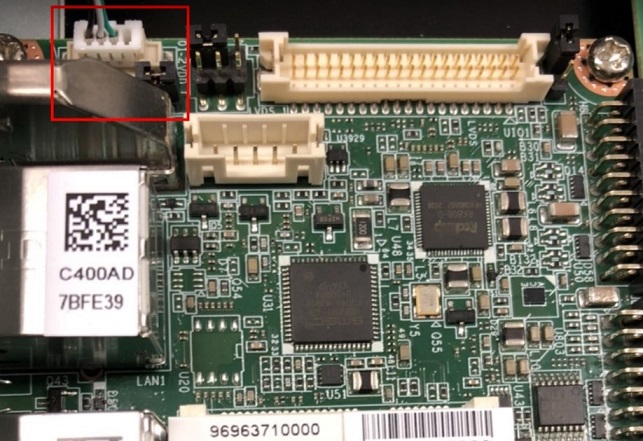
2. 設定終端機(Set Debug Terminal)
Debug 串口調試 (Debug port Setting)
以 Tera Term 为例介绍如何使用串口调试功能
Baud Rate波特率:115200 Data 数据位:8 Parity 奇偶校验:无 &nbsp; Stop 停止位:1 Flow Control流控:无
Tera Term Tool


Note:
Check the Sriel port in Device Manager (查看PC端的串口号):
if you can not identify the Serial device , please check your serial driver.
3.打開燒錄軟體

4. 打開電源
5. 在終端機上可看到Debug 訊息, 按下"Ctrl + C" 組合鍵. 進入u-boot

6. 在u-boot ,輸入"loader" 可進入燒錄模式 , Android tool 會同時顯示 "Found One MASKROM Device "

7. 在RKDevTool 按下 "Run" ,可進行燒錄.

8. 燒錄完畢

9. 重新拔插電源, 讓RSB-3710 重新開機 ,接上HDMI ,可顯示安卓的桌面.

Linux 燒錄方法 (Linux Flash eMMC Method)
1. 請先準備一條 mirco USB 線材 和 Debug Cable
mirco USB
Debug Cable

2. 插入 RSB-3710 的OTG port

連接 Debug cable

3. 設定終端機(Set Debug Terminal)
Debug 串口調試 (Debug port Setting)
以 Tera Term 为例介绍如何使用串口调试功能
Baud Rate波特率:115200 Data 数据位:8 Parity 奇偶校验:无 &amp;nbsp; Stop 停止位:1 Flow Control流控:无
Tera Term Tool
Note:
查看PC端的串口号(Check the Sriel port in Device Manager) :
如果沒有找到 請先確認是否有安裝驅動(if you can not identify the Serial device , please check your serial driver.)
3.打開燒錄軟體

4. 打開電源
5. 在終端機上可看到Debug 訊息, 按下"Ctrl + C" 組合鍵. 進入u-boot
6. 在u-boot ,輸入"rbrom " 可進入燒錄模式 , Android tool 會同時顯示 "Found One MASKROM Device "

7. 清除後,重新上電,會直接進入 "Found One MASKROM Device" 燒錄模式
8. 在RKDevTool 按下 "Run" ,可進行燒錄.
9. 燒錄完畢
10. 重新拔插電源, 讓RSB-3710 重新開機 ,接上HDMI ,可顯示Debian的桌面.

系统的基本使用(Linux System Basic Operating Method)
Display Setting (RSB-3710)
| lvds | lvds-g070vw01; lvds-g150xgel05; lvds-g215hvn01 |
| hdmi | hdmi-default |
| dp | dp-default |
| IN uboot | In Debian/Android |
| setenv prmry_screen hdmi-default | fw_setenv prmry_screen hdmi-default |
| setenv extend_screen edp-1920x1080 | fw_setenv extend_screen edp-1920x1080 |
| saveenv | |
| reset | reboot |
In u-boot:
=> setenv prmry_screen lvds-g070vw01
=> setenv extend_screen hdmi-default
=> saveenv
=> reset
In Linux:
~# fw_setenv prmry_screen lvds-g070vw01
~# reboot
Modify LVDS backlight PWM: (Defaul is 20KHz, New version BSP support to modify the PWM clock in u-boot from 200~20KHz)
In u-boot:
=> setenv lvds_pwm_clock 10000 (Set PWM clock to 10KHz)
In Linux:
~# fw_setenv lvds_pwm_clock 10000 (Set PWM clock to 10KHz)
~# reboot
Check PWM duty sysle in Linux:
~# cat /sys/kernel/debug/pwm

乙太網路使用方法(Ethernent Testing Method)
Command : ifconfig
Command: Ping 8.8.8.8
WiFi使用方法(WIFI Testing Method)
# killall wpa_supplicant # ifconfig wlan0 up # wpa_passphrase &quot;SSID&quot; &quot;PASSWORD&quot; &gt; /tmp/wpa.conf # cat /tmp/wpa.conf # wpa_supplicant -BDwext -iwlan0 -c/tmp/wpa.conf # udhcpc -b -i wlan0 # ifconfig # ping 8.8.8.8 Add DNS to /etc/resolv.conf # cat /etc/resolv.conf # Generated by Connection Manager nameserver 8.8.8.8 nameserver 8.8.4.4 Now can ping google.com # ping google.com
4G使用方法(4G Testing Method)
<a href="Ubuntu%20-%204G%20%E6%A8%A1%E5%A1%8A%28EC-25J%29%20%E8%A8%AD%E5%AE%9A%20%28%204G%20module%20%28EC-25J%29%20in%20Ubuntu%20system%29">Ubuntu - 4G 模塊(EC-25J) 設定 ( 4G module (EC-25J) in Ubuntu system) </a>
<a href="Ubuntu%20-%204G%20%E6%A8%A1%E5%A1%8A%28EC-20%29%20%E8%A8%AD%E5%AE%9A%28%204G%20module%20%28EC-20%29%20in%20Ubuntu%20system%29">Ubuntu - 4G 模塊(EC-20) 設定( 4G module (EC-20) in Ubuntu system) </a>
GPIO使用方法(GPIO Operating Method)


蓝牙使用方法(BlueTooth Operating Method)
# hciattach /dev/ttymxc0 bcm43xx 115200 flow
# hciconfig hci0 up
# hcitool scan# bluetoothctl
# discoverable on
#pairable on
# scan on
# scan off
# pair 84:C5:A6:D3:AF:E4
# connect 84:C5:A6:D3:AF:E4
Check BT connect info
# info 84:C5:A6:D3:AF:E4
音訊使用方法(BlueTooth Operating Method)
Line-in , Line-out, MIC
1.Line-out
Command&amp;nbsp;: gplay-1.0
2.MIC
Command&amp;nbsp;: arecord
Check audio codec:
# cat /proc/asound/cards
0 [sgtl5000 ]: sgtl5000 - sgtl5000
sgtl5000
1 [audiohdmi ]: audio-hdmi - audio-hdmi
audio-hdmi
root@imx8mprsb3720a1:~#
Set Mic/audio volume
# amixer set Mic 100%
# amixer set Lineout 100%
# amixer set PCM 100%
Record and playback
Example command:
# arecord &ndash;t wav &ndash;c 1 &ndash;r 44100 &ndash;d 5 /tmp/mic.wav
# aplay /tmp/mic.wav
Record from MIC:
# arecord -D plughw:0,0 -r 16000 -f S16_LE ./f-16000.wav
Recording WAVE &#39;./f-16000.wav&#39;&amp;nbsp;: Signed 16 bit Little Endian, Rate 16000 Hz, Mono
# aplay f-16000.wav
Playing WAVE &#39;f-16000.wav&#39;&amp;nbsp;: Signed 16 bit Little Endian, Rate 16000 Hz, Mono
Play wav file from codec:
# aplay -D plughw:0,0 file_example_WAV_10MG.wav
Playing WAVE &#39;file_example_WAV_10MG.wav&#39;&amp;nbsp;: Signed 16 bit Little Endian, Rate 44100 Hz, Stereo
Play wav file from HDMI:
# aplay -D plughw:1,0 file_exam
ple_WAV_10MG.wav
Playing WAVE &#39;file_example_WAV_10MG.wav&#39;&amp;nbsp;: Signed 16 bit Little Endian, Rate 44100 Hz, Stereo
看門狗測試 (Watch Dog Test method)
System will reboot after 1 sec
# /unit_tests/Watchdog/wdt_driver_test.out 1 2 0
遠程訪問及文件傳輸(Remote Access and File Transimmion)
查看主板IP位址 ( Chech IP Address ):
Command&amp;nbsp;: ifconfig

Windows下SSH访问及文件传输
SSH Remote Log into Device
- SSH远程登录,以putty选择putty.exe(或者使用Xshell、SecureCRT等类似软件)
- 需要设置远程设备的IP、通讯端口(默认22)、通讯方式,登录后验证用户名密码


通用方法(General Method)
查看CPU温度(Check CPU Temperature)
    root@linaro-alip:~# cat /sys/devices/virtual/thermal/thermal_zone0/temp   40000

    # 或者直接以度爲單位顯示 echo $[$(cat /sys/class/thermal/thermal_zone0/temp)/1000]° >>> 40°
查看CPU频率(Check CPU Frequency)
           cat /sys/devices/system/cpu/cpu0/cpufreq/cpuinfo_cur_freq
           >> 1200000
           cat /sys/devices/system/cpu/cpu0/cpufreq/cpuinfo_max_freq
           >> 1800000
查看内存容量(Check Memory Capacity)
root@linaro-alip:~# busybox free -m &nbsp; &nbsp; &nbsp; &nbsp; &nbsp; &nbsp; &nbsp; total &nbsp; &nbsp; &nbsp; &nbsp;used &nbsp; &nbsp; &nbsp; &nbsp;free &nbsp; &nbsp; &nbsp;shared &nbsp;buff/cache &nbsp; available Mem: &nbsp; &nbsp; &nbsp; &nbsp; &nbsp; 1961 &nbsp; &nbsp; &nbsp; &nbsp; 303 &nbsp; &nbsp; &nbsp; &nbsp;1096 &nbsp; &nbsp; &nbsp; &nbsp; &nbsp;97 &nbsp; &nbsp; &nbsp; &nbsp; 561 &nbsp; &nbsp; &nbsp; &nbsp;1575 Swap: &nbsp; &nbsp; &nbsp; &nbsp; &nbsp; &nbsp; 0 &nbsp; &nbsp; &nbsp; &nbsp; &nbsp; 0 &nbsp; &nbsp; &nbsp; &nbsp; &nbsp; 0 root@linaro-alip:~#
查看存储容量(Check Storage Capacity)
root@linaro-alip:~# busybox df -h Filesystem &nbsp; &nbsp; &nbsp; &nbsp; &nbsp; &nbsp; &nbsp; &nbsp;Size &nbsp; &nbsp; &nbsp;Used Available Use% Mounted on /dev/root &nbsp; &nbsp; &nbsp; &nbsp; &nbsp; &nbsp; &nbsp; &nbsp; 7.8G &nbsp; &nbsp; &nbsp;2.8G &nbsp; &nbsp; &nbsp;4.6G &nbsp;37% / devtmpfs &nbsp; &nbsp; &nbsp; &nbsp; &nbsp; &nbsp; &nbsp; &nbsp;972.3M &nbsp; &nbsp; &nbsp;8.0K &nbsp; &nbsp;972.3M &nbsp; 0% /dev tmpfs &nbsp; &nbsp; &nbsp; &nbsp; &nbsp; &nbsp; &nbsp; &nbsp; &nbsp; 980.8M &nbsp; &nbsp; &nbsp; &nbsp; 0 &nbsp; &nbsp;980.8M &nbsp; 0% /dev/shm tmpfs &nbsp; &nbsp; &nbsp; &nbsp; &nbsp; &nbsp; &nbsp; &nbsp; &nbsp; 980.8M &nbsp; &nbsp; 16.8M &nbsp; &nbsp;964.0M &nbsp; 2% /run tmpfs &nbsp; &nbsp; &nbsp; &nbsp; &nbsp; &nbsp; &nbsp; &nbsp; &nbsp; &nbsp; 5.0M &nbsp; &nbsp; &nbsp;4.0K &nbsp; &nbsp; &nbsp;5.0M &nbsp; 0% /run/lock tmpfs &nbsp; &nbsp; &nbsp; &nbsp; &nbsp; &nbsp; &nbsp; &nbsp; &nbsp; 980.8M &nbsp; &nbsp; &nbsp; &nbsp; 0 &nbsp; &nbsp;980.8M &nbsp; 0% /sys/fs/cgroup /dev/mmcblk1p10 &nbsp; &nbsp; &nbsp; &nbsp; &nbsp; 6.4G &nbsp; &nbsp; &nbsp;3.8M &nbsp; &nbsp; &nbsp;6.4G &nbsp; 0% /userdata /dev/mmcblk1p7 &nbsp; &nbsp; &nbsp; &nbsp; &nbsp; 62.6M &nbsp; &nbsp; 12.0M &nbsp; &nbsp; 47.3M &nbsp;20% /oem tmpfs &nbsp; &nbsp; &nbsp; &nbsp; &nbsp; &nbsp; &nbsp; &nbsp; &nbsp; 196.2M &nbsp; &nbsp; &nbsp; &nbsp; 0 &nbsp; &nbsp;196.2M &nbsp; 0% /run/user/0 tmpfs &nbsp; &nbsp; &nbsp; &nbsp; &nbsp; &nbsp; &nbsp; &nbsp; &nbsp; 196.2M &nbsp; &nbsp; &nbsp;8.0K &nbsp; &nbsp;196.1M &nbsp; 0% /run/user/1000 root@linaro-alip:~#
網路Ping測試(Ping Network Testing)
     ping 8.8.8.8
     PING 8.8.8.8 (8.8.8.8) 56(84) bytes of data.
     64 bytes from 8.8.8.8: icmp_seq=1 ttl=54 time=2.10 ms
     64 bytes from 8.8.8.8: icmp_seq=2 ttl=54 time=2.10 ms
設置RTC (RTC Setting)
Set system time to current, then write to RTC
root@linaro-alip:~# date 01282022
Fri Jan 28 20:22:00 UTC 2022
root@linaro-alip:~#
Restart the RTC time to system time
- hwclock -s && date
root@linaro-alip:~# hwclock -s && date
Thu Jan 20 06:18:26 UTC 2022
root@linaro-alip:~#
Android BSP編譯方法(Android BSP Compile Method)
<a alt="<a alt="http://ess-wiki.advantech.com.tw/view/Debian_BSP_User_Guide_for_rk3399_risc_series " href="http://ess-wiki.advantech.com.tw/view/Debian_BSP_User_Guide_for_rk3399_risc_series " title="http://ess-wiki.advantech.com.tw/view/Debian_BSP_User_Guide_for_rk3399_risc_series ">http://ess-wiki.advantech.com.tw/view/Debian_BSP_User_Guide_for_rk3399_risc_series </a>" href="<a alt="http://ess-wiki.advantech.com.tw/view/Debian_BSP_User_Guide_for_rk3399_risc_series " href="http://ess-wiki.advantech.com.tw/view/Debian_BSP_User_Guide_for_rk3399_risc_series " title="http://ess-wiki.advantech.com.tw/view/Debian_BSP_User_Guide_for_rk3399_risc_series ">http://ess-wiki.advantech.com.tw/view/Debian_BSP_User_Guide_for_rk3399_risc_series </a>" title="<a alt="http://ess-wiki.advantech.com.tw/view/Debian_BSP_User_Guide_for_rk3399_risc_series " href="http://ess-wiki.advantech.com.tw/view/Debian_BSP_User_Guide_for_rk3399_risc_series " title="http://ess-wiki.advantech.com.tw/view/Debian_BSP_User_Guide_for_rk3399_risc_series ">http://ess-wiki.advantech.com.tw/view/Debian_BSP_User_Guide_for_rk3399_risc_series </a>"><a alt="http://ess-wiki.advantech.com.tw/view/Debian_BSP_User_Guide_for_rk3399_risc_series " href="http://ess-wiki.advantech.com.tw/view/Debian_BSP_User_Guide_for_rk3399_risc_series " title="http://ess-wiki.advantech.com.tw/view/Debian_BSP_User_Guide_for_rk3399_risc_series ">http://ess-wiki.advantech.com.tw/view/Debian_BSP_User_Guide_for_rk3399_risc_series </a></a>;
如果有驗證上的錯誤 請使用以下的方法(If you got " Server certificate verification failed " message ,please follow the solution as below)
### repo sync failed with Server certificate verification failed. CAfile: /etc/ssl/certs/ca-certificates.crt CRLfile: none
============================================================
export GIT_SSL_NO_VERIFY=1
- or
git config --global http.sslverify false
============================================================