Difference between revisions of "EPD-130 User Manual"
From ESS-WIKI
Erick.huang (talk | contribs) |
|||
| Line 1: | Line 1: | ||
= EVALUTION KIT OF EPD-130 = | = EVALUTION KIT OF EPD-130 = | ||
| + | |||
| + | PC operating system: Windows Only (Windows 7、Windows 10) | ||
== Components LIST == | == Components LIST == | ||
| Line 20: | Line 22: | ||
|} | |} | ||
| − | [[File:EPD-132R EVK Componets.png v5.png]] | + | [[File:EPD-132R EVK Componets.png v5.png|RTENOTITLE]] |
== SYSTEM ARCHITECURE == | == SYSTEM ARCHITECURE == | ||
| Line 44: | Line 46: | ||
*Click "IT8951_UpdateImage1.bat" to update "13.3inch-01.bmp" to EPD. | *Click "IT8951_UpdateImage1.bat" to update "13.3inch-01.bmp" to EPD. | ||
*Click "IT8951_UpdateImage2.bat" to update "13.3inch-02.bmp" to EPD. | *Click "IT8951_UpdateImage2.bat" to update "13.3inch-02.bmp" to EPD. | ||
| − | *Open "IT8951_UpdateImage1.bat" and edit "13.3inch-02.bmp" for your image name. | + | *Open "IT8951_UpdateImage1.bat" and edit "13.3inch-02.bmp" for your image name. |
| − | + | # *The image will not be saved in flash. [[File:EPD-132R EVK-USB2 Refresh image.png|RTENOTITLE]]</li> | |
| − | |||
| − | *The image will not be saved in flash. | ||
| − | |||
| − | [[File:EPD-132R EVK-USB2 Refresh image.png]] | ||
Revision as of 02:55, 15 October 2018
Contents
EVALUTION KIT OF EPD-130
PC operating system: Windows Only (Windows 7、Windows 10)
Components LIST
|
Item |
Description |
|---|---|
| 1 | 13.3” EPAPER |
| 2 | EPD-130 PCBA |
| 3 | cable |

SYSTEM ARCHITECURE

EVALUATION KIT HANDS-ON
Follow steps and picture below to setup the hardware
- Connected EPD FPC to mainboard
- Connected USB cable to mainboard USB2(CN2)

- Download and unzip EPD-132R_CLI_tool
- Click "IT8951_FWVersion.bat" to get EPD panel information

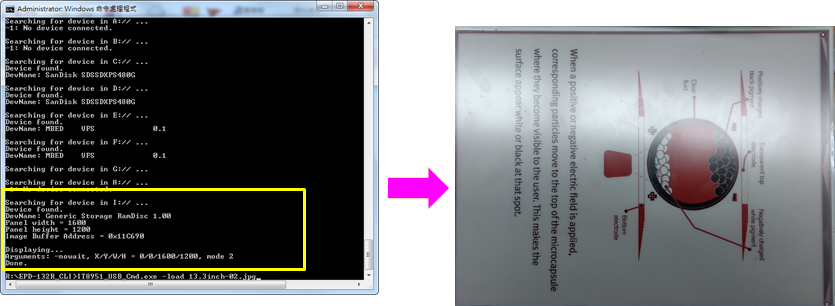
- Download and Refresh Image
- Click "IT8951_UpdateImage1.bat" to update "13.3inch-01.bmp" to EPD.
- Click "IT8951_UpdateImage2.bat" to update "13.3inch-02.bmp" to EPD.
- Open "IT8951_UpdateImage1.bat" and edit "13.3inch-02.bmp" for your image name.
- *The image will not be saved in flash.