Difference between revisions of "RSB-3720 Ubunut creation by Yocto30 kernel"
From ESS-WIKI
| Line 48: | Line 48: | ||
:<span style="font-size:large;"><span style="font-size:large;">[[File:RSB-3720 Ubunut creation by Yocto30 kernel Mount Yocto image and Ubuntu image Partition2.png|RTENOTITLE]]</span></span> | :<span style="font-size:large;"><span style="font-size:large;">[[File:RSB-3720 Ubunut creation by Yocto30 kernel Mount Yocto image and Ubuntu image Partition2.png|RTENOTITLE]]</span></span> | ||
: | : | ||
| + | |||
== '''Change rootfs''' == | == '''Change rootfs''' == | ||
| Line 56: | Line 57: | ||
:[[File:RSB-3720 Ubunut creation by Yocto30 kernel copy module.png|RTENOTITLE]] | :[[File:RSB-3720 Ubunut creation by Yocto30 kernel copy module.png|RTENOTITLE]] | ||
| − | |||
*'''<span style="font-size:medium;">Delete under Yocto rootfs all files, and replace to Ubuntu rootfs</span>''' | *'''<span style="font-size:medium;">Delete under Yocto rootfs all files, and replace to Ubuntu rootfs</span>''' | ||
| Line 76: | Line 76: | ||
:<span style="font-size:large;"><code>$ sudo cp -a ~/modules ~/yocto/rootfs/lib/</code></span> | :<span style="font-size:large;"><code>$ sudo cp -a ~/modules ~/yocto/rootfs/lib/</code></span> | ||
| − | :<span style="font-size:large;">[[File:RSB-3720 Ubunut creation by Yocto30 kernel change module.png|RTENOTITLE]]</span> | + | :<span style="font-size:large;">[[File:RSB-3720 Ubunut creation by Yocto30 kernel change module.png|RTENOTITLE]]</span> |
== '''Analyze dependency file''' == | == '''Analyze dependency file''' == | ||
Revision as of 06:30, 18 August 2023
Prepare Image
- Build Yocto Linux image with your expected version (e.g. A0386)
- You can follow this SOP to build your Yocto image.
- Modify kernel to "Add commit to support the Ubuntu desktop version"

- Prepare Ubuntu image (e.g. A0362)

Mount image
- You can find Yocto image in${WORKSPACE}/build/tmp/deplay/image/${MC}, and copy to your ${WORKSPACE}.
$ sudo cp –a imx-image-${MC}-20230816082527.rootfs.wic.bz2 ${WORKSPACE}.

- Unpack rootfs.wic
$sudo bzip2 -d imx-image-full-${MC}-20230814102331.rootfs.wic.bz2

- Create folders to mount
$mkdir ubuntu yocto
$mkdir ubuntu/rootfs yocto/rootfs

- Mount Yocto image and Ubuntu image Partition2
$sudo losetup --show -f -P imx-image-full-imx8mprsb3720a1-20230814102331.rootfs.wic
$sudo mount /dev/loop22p2 yocto/rootfs/
$sudo losetup --show -f -P 3720A1AIM30UIVA0362_iMX8MP_4G_2021-11-29.img
$sudo mount /dev/loop23p2 ubuntu/rootfs/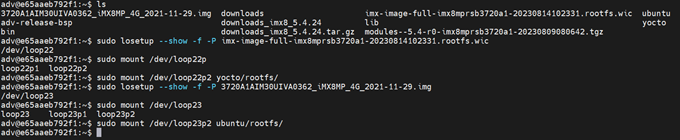

Change rootfs
- Copy Yocto module to${WORKSPACE}, then you can find Yocto module in rootfs/lib
$ sudo cp -a yocto/rootfs/lib/modules/ /home/adv/

- Delete under Yocto rootfs all files, and replace to Ubuntu rootfs
$ sudo rm -rf yocto/rootfs/
$ sudo cd ubuntu/rootfs/
$ sudo cp -a bin boot dev etc home lib media mnt opt proc root run sbin srv swapfile sys tmp usr var ~/yocto/rootfs/

- Repalce with Yocto module
$ cd ~/yocto/roosfs/lib
$ sudo rm -rf modules/
$ sudo cp -a ~/modules ~/yocto/rootfs/lib/

Analyze dependency file
- Enter target image root directory
$ sudo chroot rootfs/

- Analyze file replaced by module dependencies
$ depmod -a 5.4.70-2.3.0/
