RISC 142 207 eFlow
Contents
142 and 207 檔案上傳處 (務必用IT 指定S3 Broser 來上傳 )
上傳文件S3 FTP 與 S3 FTP 使用方式 下載點: S3 Broser
上傳文件路徑範例如下:
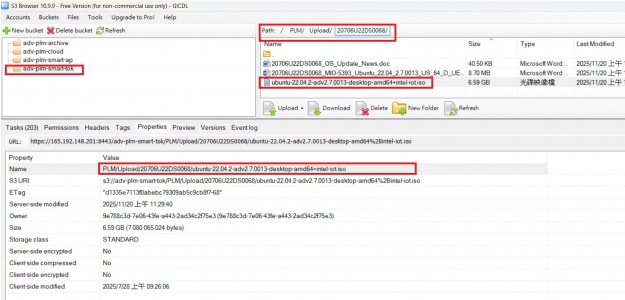

如上圖 請點選Properties 後
下面欄位Name的Value欄位 PLM/Upload/20706U22DS0068/ubuntu-22.04.2-adv2.7.0013-desktop-amd64+intel-iot.iso
copy 後 在組成完整文字來填寫檔案路徑 File:ftp://globalimagecenter.advantech.corp/PLM/Upload/20706U22DS0068/ubuntu-22.04.2-adv2.7.0013-desktop-amd64+intel-iot.iso
SPI example :
File:ftp://globalimagecenter.advantech.corp/PLM/upload/ROM-7420/7420LIV2940_DualQuad_1G_64b_2017-12-12_spi.bin
Checksum:8bd2
EMMC example :
File:ftp://globalimagecenter.advantech.corp/PLM/upload/20200926_4411_Fujifilm/4411_DualLiteSolo_20200926_Fujifilm.bin
Checksum:255c
142 and 207 Request (務必要用微軟的 Edge (原 IE ) 瀏覽器來進行 )
| 142 | 207 | |
| Part Cat | 142 NON BIOS | 207 Image |
| Sub Bom | 1410027092-01 | |
| Manufacturer Part Number | MTFC4GACAJCN-1M WT | NA |
| Manufacturer | Micron Technology Inc. | Advantech Co., LTD |
| Request for Plant | TWM8(ATMC-LK-Board) | TWM8(ATMC-LK-Board) |
142 Flow
- SPI binary / EMMC binary (142階) 提供給燒錄廠
- Request for Plant: TWM9 更改 Request for Plant: TWM9(ATMC-LK-System)
- Request for Plant: TWM8 更改 Request for Plant: TWM8(ATMC-LK-Board)
- Checksum 計算方式 : jacksum -a sum32 -x 檔名

- Example : Description : FLASH "Machine Name" "Software Version" "Checksum" "EMMC Name"
- Software Version must begin with a capital letter "V"
Apply for P/N or not: Y
Part Cat: 142 NON BIOS
Description: FLASH RSB-4411 V8AC0 CS:e59c MTFC4GACAJCN-1M
Sub BOM: 1410027092-01
Manufacturer Part Number: MTFC4GACAJCN-1M WT
Manufacturer: Micron Technology Inc.
Project Name: EBC-RS02LD-PUA1E
Product Line: RSOM
Request for Plant: TWM8(ATMC-LK-Board)

當RD 收到單子後 可以依照下面範例 將檔案上傳至 公司 FTP upload 資料夾在 "簽核確認" 這邊填寫下面example 資訊
SPI example :
File:ftp://globalimagecenter.advantech.corp/PLM/upload/ROM-7420/7420LIV2940_DualQuad_1G_64b_2017-12-12_spi.bin
Checksum:8bd2
EMMC example :
File:ftp://globalimagecenter.advantech.corp/PLM/upload/20200926_4411_Fujifilm/4411_DualLiteSolo_20200926_Fujifilm.bin
Checksum:255c

207 flow
- Image (online) / Factory test Image (207階) 提供給工廠線上
- Request for Plant: TWM9 更改 Request for Plant: TWM9(ATMC-LK-System)
- Request for Plant: TWM8 更改 Request for Plant: TWM8(ATMC-LK-Board)
- Request for Plant: CKB3 更改 Request for Plant: CKB3(AKMC-System_Bond, 保稅)

- Example : (Android RSB-3810 207 Image)
- Example : Description : Image "OS Name" RISC-based "Software Version" "Product Name" for "Customer Name"
- Software Version must begin with a capital letter "V"
- If OS is "Android", Description: Image Android RISC-based V10058 RSB3810 for STD
- If OS is "Yocto", Description: Image Yocto V10058 RSB3810 for STD
QCS6490 207 Example
Apply for P/N or not: Y
Part Cat: 207 Image
Description: Image Yocto V10058 DS011 for STD
Sub BOM:
Manufacturer Part Number: NA
Manufacturer: Advantech Co., LTD
Project Name: DS011 standard image
Product Line: RISC
Request for Plant: TWM8(ATMC-LK-Board)
RSB3810 Example
Apply for P/N or not: Y
Part Cat: 207 Image
Description: Image Android RISC-based V10058 RSB3810 for STD
Sub BOM:
Manufacturer Part Number: NA
Manufacturer: Advantech Co., LTD
Project Name: RSB3810 standard image
Product Line: RISC
Request for Plant: TWM9(ATMC-LK-System)
Project Name : name + xxx + image
Example : customer release image Project Name : RSB3720 customized image
xxx example (image type). S: standard image C: consigned image M: customized image I: image for issue fixing(Option) D: demo image R: IEC-62443

- 請 PM 開單 務必在 ISSUE TYPE 中填入 : Consigned Image PN (如上圖)
- 當RD收到 clayder.huang 轉發的email裡面包含207階料號
- 接下來要將承認信 或是Test report 上傳至 172.22.31.128下
- 承認信 或是Test report Path : \\172.22.31.128\images\Consigned Image\20706LYT1C0004\xxxx.txt
- 其207階也要上傳至ftp
- 路徑也要對應 ftp://globalimagecenter.advantech.corp/PLM/upload/20706LYT1C0004/4710.bin
- 之後回復Eflow單 在簽核意見 上面填寫 part number:20706LYT1C0004
- (注意都要寫小寫, ":號" 後面不要有空白)

Android
If your request is Android, please add information in Description.
- Android version X.Y.Z for X86-based (No License)
- Android version X.Y.Z for RISC-based (No License)
NVIDIA Ubuntu 207 flow example
If your request is Ubuntu, please add Ubuntu OS part number.
目前幾個錯誤範例
(1) Description 冒號後面 沒有依照四大項來填寫 Image "OS Name" "Software Version" "Product Name"
Image Ubuntu 為固定名稱,
Software Version 開頭要 大寫 V 後面接數字或文字 , 但不可以接符號或是特殊符號.
Product Name 為產品名稱 可以數字或文字
(2) TWM9(ATMC-LK-System) 有發生過 TWM9 後面空下一個空白 在接續 (ATMC-LK-System) , 請勿增加空白
(3) 接下來 以下步驟 到承認信或是 Test report 請幫忙擇一給 , 並且給一個文檔即可 不要放超過1個以上的檔案
- 當RD收到 clayder.huang 轉發的email裡面包含207階料號
- 接下來要將承認信 或是Test report 上傳至 172.22.31.128下
- 承認信 或是Test report Path : \\172.22.31.128\images\Consigned Image\20706LYT1C0004\xxxx.txt
(4) Sub BOM 後面是要填寫 Ubuntu 料號 968MOUJTSN 請PM 與軟體PM Neo.Lo / Elyse.Hsueh 確認一下
(5) Project Name: EPC-R7300 standard image 這邊 standard image 有 4 種可以填寫 standard image / consigned image / customized image / demo image 請勿填寫其他
(6) 開單的 ISSUE TYPE Consigned Image PN OS TYPE [RISC] Linux
- 請 PM 開單 務必在 ISSUE TYPE 中填入 : Consigned Image PN (如上圖)
Apply for P/N or not: Y
Part Cat: 207 Image
Description: Image Ubuntu V20006 EPC-R7300
Sub BOM: 968MOUJTSN
Manufacturer Part Number: NA
Manufacturer: Advantech Co., LTD
Project Name: EPC-R7300 standard image
Product Line: UBCD
Request for Plant: TWM9(ATMC-LK-System)

207 vs 208 number Different
The 207 level number is for OS.
The 208 level number is for online firmware used.
142 T number from PM Request
1.PM Send "SW Request EFlow list " to SW RD and provide the RISC_Platform(for create EMMC T number file).
(PM 開立軟體需求單給軟體RD 並提供對應客人的硬體設備)
2.The SW RD get SW_Request from PM.
(軟體RD收到來自於 PM的軟體需求單)
3.Customer provide the EMMC or SD IMAGE(The SD image can update emmc.) Customer need to provide the SOP About the update emmc
(軟體 RD 務必確認是否 客人提供足夠的資訊: 包含更新EMMC的SD檔案, 軟體版本以及更新完後是否有哪些資訊)
4.Prepire the SD card and Upadet EMMC. Reference Customer SOP.
5.Dump EMMC Binary to USB. (EMMC 通常超過 16G 務必準備 32G or 64G 來進行) --> USB Disk 需要format exfat
6.SW RD Provide the EMMC to PM. Then PM provide the EMMC file to Custormer. (軟體 RD 提供 EMMC Binary 給PM PM 提供給客人)
7. PM get customer feedback "emmc is correct". (客人確認過後 發確認信函 回覆沒問題)
8. SW RD upload the "EMMC binary" to FTP. (開始進行 142階流程)
9. SW RD doblue check Checksum. (SW RD 需進行兩階段確認 EMMC Binary checksum)
使用 Fsum Fromtend Tools (windows 工具)
使用 jacksum -a sum32 -x xxxx.bin ( xxxx.bin 為 emmc binary file name) (ubuntu 工具)
10. 142 number flow. (PM Send 142 number EFlow list).